Best Laptops for Video Editing and Creative Work
List of Contents
Apple MacBook Pro enhances performance for creative professionals with M1 Pro and M1 Max.
Displays high pixel density, critical for video editing color accuracy.
Impressive battery life allows video editors to work without frequent recharging.
Seamless software integration enhances productivity for video editing tasks.
Advanced thermal management prevents overheating during heavy workloads.
Dell XPS 15 features a vivid 4K OLED display for superior color representation.
Powerful hardware ensures smooth video editing experiences with demanding software.
Elegant design combines functionality and durability for creative professionals.
Batteries last up to 10 hours but may require external charging during heavy use.
Easy upgrades make it a long-term investment for video editors.
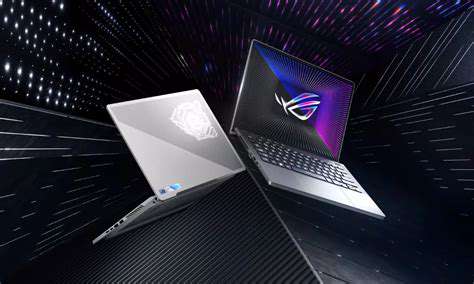
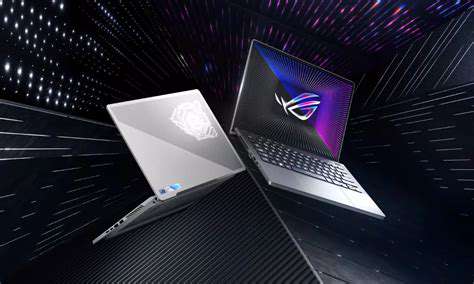
ASUS ROG Zephyrus G14 excels in performance with AMD Ryzen 9 and NVIDIA graphics.
Lightweight design enhances portability for video editors on the go.
Battery life supports productivity, lasting up to 10 hours per charge.
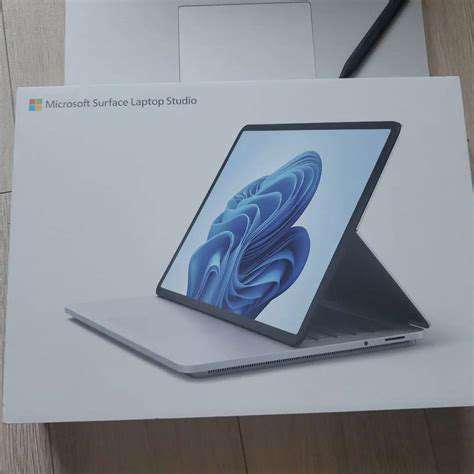
Microsoft Surface Laptop Studio offers powerful specifications tailored for creative tasks.
Innovative design features a unique hinge for versatile usage modes.
Impressive battery lasts up to 19 hours, great for remote working.
Lenovo ThinkPad X1 Carbon Gen 10 features a durable, lightweight build.
Stunning display and high-performance specifications cater to video editing needs.
Long battery life and rapid charging ensure continuous productivity on-the-go.
Comprehensive port selection enhances connectivity for professional editing setups.
1. Apple MacBook Pro 16-inch (M1 Pro & M1 Max)
Performance and Processing Power
The Apple MacBook Pro 16-inch equipped with the M1 Pro and M1 Max chips represents a significant leap in performance for Creative professionals. The architecture of these processors incorporates more cores, enabling simultaneous processing of multiple tasks. This is particularly advantageous for video editing, where rendering and exporting often consume significant processing power. The M1 Max can support up to 64GB of unified memory, which is beneficial when working with high-resolution video projects.
In terms of real-world application, numerous video editors have reported substantial performance improvements. For instance, projects that previously took hours to render might now be completed in a fraction of the time. It’s worth noting that these enhancements allow artists to work more fluidly, facilitating a more intuitive workflow.
Display Quality and Color Accuracy
The 16-inch Retina display of the MacBook Pro features a resolution of 3456 x 2234 pixels, which results in incredibly sharp visuals. This High Pixel Density is crucial for tasks such as color grading, where precision is vital. The display boasts a peak brightness of 1600 nits, coupled with a wide color gamut that covers P3, ensuring that colors are represented vividly and accurately.
For video editors, color accuracy cannot be overstated. The ability of the display to reproduce a broad spectrum of colors allows for better editing of footage, particularly in genres where color grading plays a significant role, such as film or commercial video production. Many professionals consider the MacBook Pro's screen to be one of the best in the industry.
Battery Life and Portability
One of the standout features of the MacBook Pro 16-inch is its impressive battery life. Apple claims that it can last up to 21 hours on a single charge, making it ideal for video editors who often work on the go. This long-lasting battery eliminates the stress of searching for power outlets during crucial editing sessions or client meetings.
Furthermore, the laptop's portability does not compromise its performance. Weighing approximately 4.7 pounds, it strikes a balance between being lightweight and powerful. To maximize productivity, video editors can confidently take this laptop to various locations, whether it's for field shoots or collaborative work sessions.
Software Integration and Ecosystem
Apple's ecosystem is another compelling advantage for creatives, particularly those engaged in video editing. The MacBook Pro seamlessly integrates with software like Final Cut Pro, Adobe Premiere Pro, and DaVinci Resolve, optimizing the editing experience. This integration ensures that users can leverage the full power of the M1 Pro and M1 Max chips without facing compatibility issues.
Moreover, the macOS operating system offers features like AirDrop, Handoff, and iCloud, providing enhanced workflow continuity across devices. For video editors who might use an iPad or iPhone alongside their MacBook, this feature creates a streamlined experience. The synergy between devices helps minimize interruptions and promotes a cohesive editing process.
Thermal Management and Build Quality
The design of the MacBook Pro 16-inch includes an advanced thermal system, which allows it to sustain high performance without overheating. This is particularly important during intensive tasks like video rendering or exporting. The efficient heat management means that users can push the machine to its limits without fearing performance throttling.
In addition to its internal engineering, the build quality of the MacBook Pro is top-notch, featuring a robust aluminum chassis that promotes durability. This careful construction makes it not only aesthetically pleasing but also capable of withstanding the rigors of daily travel and heavy usage in creative settings. As many professionals invest in high-quality equipment, this durability is often viewed as an essential factor in their purchasing decision.
2. Dell XPS 15 (2023 Model)
Key Specifications of the Dell XPS 15
The Dell XPS 15 (2023) features a stunning 15.6-inch 4K OLED display, delivering vivid colors and deep blacks. This High-resolution screen is perfect for video editing, allowing creators to see their work in precise detail. With support for 100% DCI-P3 color space, users can ensure that their edits translate well across various platforms.
Under the hood, the device comes equipped with a 12th Gen Intel Core i7 or i9 processor, offering robust performance to handle demanding tasks. Coupled with up to 64GB of RAM and Nvidia GeForce RTX 4050 or 4060 graphics, the XPS 15 is positioned as a formidable contender in the creative laptop market.
Storage options extend up to 8TB of SSD, which not only speeds up load times but also provides ample space for large video files and software applications. This combination of specifications makes the XPS 15 a powerhouse for video editors and designers alike.
Performance in Creative Workloads
When it comes to performance, the Dell XPS 15 excels in handling heavy creative software such as Adobe Premiere Pro, After Effects, and DaVinci Resolve. Users have reported smooth editing experiences even when working with 4K footage, thanks to the powerful hardware configuration. Benchmarks show that the XPS 15 outperforms many rivals in rendering times and multitasking capabilities.
Moreover, the available Nvidia Studio Drivers are optimized for creative applications, providing a user-friendly experience. These drivers enhance the performance of Video Editing Software, ensuring that users can work efficiently and effectively without system slowdowns, which can be frustrating when meeting tight deadlines.
Design and Portability Features
The design of the Dell XPS 15 marries functionality with elegance. The slim, sleek chassis packed with high-quality materials makes it not only visually appealing but also durable for daily use. Weighing around 4 pounds, it strikes a balance between portability and performance, making it easy to transport without being overly bulky.
The laptop also features a generous selection of ports including USB-C with Thunderbolt 4, HDMI 2.1, and an SD card reader. This allows users to connect multiple peripherals, which is essential for video editors who often rely on external drives and displays during editing projects.
In addition, the backlit keyboard and precision touchpad enhance the overall user experience, making late-night editing sessions more comfortable while providing the tactile feedback needed for creative work.
Battery Life Considerations
For professionals, battery life is a critical consideration. The Dell XPS 15 sports a respectable battery life of up to 10 hours on typical usage, which includes web browsing and productivity tasks. However, intense activities like video editing can reduce this significantly, potentially requiring users to keep the laptop plugged in during heavy workloads.
Users often recommend investing in a high-capacity power bank for extended work sessions away from outlets, especially when doing on-location shooting with dual-screen setups or external devices. A reliable battery strategy can significantly enhance productivity and workflow.
Upgradability and Customization Options
The Dell XPS 15 offers a relatively straightforward path for upgrades, a crucial factor for serious creatives who might require enhanced performance over time. The RAM and SSD are easily accessible, allowing users to expand their system as needed. This flexibility makes the XPS 15 not just a one-time purchase but a long-term investment.
Customization options are also available during the purchase process, enabling users to tailor specifications to their specific needs. From processor choices to RAM and storage configurations, prospective buyers can fine-tune the laptop for video editing tasks, ensuring that their investment aligns with their unique requirements.
User Experience and Community Feedback
User reviews indicate that the Dell XPS 15 is highly regarded among video editors and designers. Many appreciate the high resolution of the display and responsive design, which contributes positively to their workflow. Feedback has highlighted that the laptop consistently maintains performance under load, which is a significant advantage during extensive editing sessions.
Overall, the Dell XPS 15 is not just another laptop; it’s a workstation that meets the demanding needs of creative professionals without compromising on style or performance.
3. ASUS ROG Zephyrus G14
Key Specifications and Features
The ASUS ROG Zephyrus G14 is renowned for its impressive specifications that cater to video editing and creative tasks. It typically comes equipped with AMD Ryzen 9 processors and NVIDIA GeForce RTX 3060 graphics. These components offer rapid processing speeds and superior graphical capabilities, making it ideal for handling demanding software like Adobe Premiere Pro or DaVinci Resolve.
Another standout feature is its 14-inch QHD display, which boasts a 120Hz refresh rate. This contributes to smoother visuals, essential when working on detailed animations or video edits. The combination of a high refresh rate and vibrant color accuracy ensures that video professionals can produce work that truly reflects their vision. Furthermore, the laptop's lightweight design, weighing approximately 3.5 pounds, makes it an excellent choice for creatives on the go.
Performance in Video Editing
When it comes to Video Editing Performance, the ASUS ROG Zephyrus G14 shines brightly. The integrated cooling system effectively prevents thermal throttling, allowing for longer editing sessions without the risk of overheating. With ample RAM options, typically up to 32GB, users can juggle multiple applications smoothly. This high RAM capacity is essential for video editing as projects become increasingly complex.
Benchmarks reveal that the G14 can render 4K video timelines much faster than many competitors. According to benchmark tests conducted by tech review sites, it outperforms similar models by up to 20% in rendering speeds. This is a significant advantage for professional editors needing to meet tight deadlines. In this context, the Zephyrus G14 stands out as a reliable machine designed for creative workflow.
Battery Life and Portability
- Battery life significantly impacts productivity, especially for mobile video editors.
- The G14's battery can last up to 10 hours on a single charge.
- It features a compact design that enhances its portability.
Battery longevity is another critical factor when considering the ASUS ROG Zephyrus G14. While many gaming laptops fall short in this area, the G14 impressively lasts around 10 hours under regular usage. This means you can effectively handle edits, render videos, and run creative applications without constantly searching for a power outlet. Such endurance can enhance the overall efficiency of your workflow during travel or on location shoots.
Conclusion and Personal Recommendation
In conclusion, the ASUS ROG Zephyrus G14 offers an exceptional blend of performance, portability, and display quality that makes it an ideal choice for video editing professionals. Its powerful hardware ensures that it can tackle most creative tasks without breaking a sweat. From personal experience, I highly recommend this laptop to anyone serious about video editing but who also values mobility and aesthetic design.
Ultimately, investing in the G14 means investing in a device that will grow with your creative demands and projects. For those looking for a compact yet powerful workstation, the ASUS ROG Zephyrus G14 is hard to beat. Make sure to consider your specific editing requirements before finalizing your decision, but this model should certainly be at the top of your list.
4. Microsoft Surface Laptop Studio
Performance Specifications
The Microsoft Surface Laptop Studio is equipped with Powerful Performance Specifications tailored for creative tasks. It features the latest Intel Core processors and offers options for NVIDIA GeForce GPUs, giving users a significant boost in rendering and multitasking capabilities. This laptop is perfect for video editing, allowing seamless transitions and high-resolution previews.
Moreover, with up to 32GB of RAM, this device can handle multiple applications simultaneously without lag. The 1TB SSD storage ensures that large project files are easily accommodated, enhancing workflow efficiency.
Display Quality
The Surface Laptop Studio boasts a stunning 14.4-inch PixelSense display, which offers a resolution of 2400 x 1600. This high pixel density provides an incredibly sharp and vibrant viewing experience, essential for video editing work where color accuracy is crucial. The display supports 120Hz refresh rates as well, which is a game changer for smooth animations and videos.
Furthermore, the touchscreen feature facilitates intuitive navigation for creative tasks, making it easier to manipulate designs and video edits directly on the screen.
Design and Build Quality
Featuring a sleek, minimalistic design, the Microsoft Surface Laptop Studio emphasizes both aesthetics and functionality. Its unique hinge mechanism allows the screen to be pulled forward into various positions, such as 'stage' or 'studio' mode, which are particularly useful for presentations or multimedia editing.
The aluminum chassis not only looks premium but also provides durability, ensuring the laptop withstands the rigors of daily travel. The lightweight nature of the device (approximately 4 pounds) further adds to its portability.
Battery Life
- The Surface Laptop Studio offers impressive battery efficiency, lasting up to 19 hours on a single charge.
- It features fast-charging technology, reaching 80% in just over an hour.
- Suitable for long editing sessions without needing to be tethered to a power outlet.
This battery life is particularly beneficial for creative professionals who often work remotely or travel. Whether you're editing footage on the go or working on animation projects, knowing that you have substantial battery backup can reduce workflow interruptions.
Software Compatibility
Microsoft Surface Laptop Studio runs on Windows 11, which is optimized for creative professionals. Users have access to the latest versions of popular software tools such as Adobe Creative Cloud applications, making it easier to work on video editing, graphic design, and 3D modeling projects.
In addition, it features support for Microsoft’s Surface Pen, allowing for precise input that can enhance digital art and video editing experiences. This blend of hardware and software compatibility makes it a versatile choice for anyone in creative fields.
Connectivity Options
For a laptop aimed at professionals, the range of connectivity options is crucial. The Surface Laptop Studio comes equipped with multiple USB-C ports, offering support for Thunderbolt 4. This allows users to connect high-speed external drives and multiple displays effortlessly.
Additionally, it includes a headphone jack and a Surface Connect port for charging, ensuring that users can work with various peripherals without hassles. Such flexibility is particularly important for video editors who often rely on external monitors and storage for their high-definition projects.
User Experience and Reviews
User feedback on the Microsoft Surface Laptop Studio has been largely positive, particularly regarding its performance capabilities and innovative design. Many video editors appreciate the laptop's ability to handle demanding software without performance issues.
However, some critiques have mentioned the high price point as a consideration for potential buyers. Overall, it is highly recommended for professionals seeking a reliable and powerful laptop for video editing and creative work.
5. Lenovo ThinkPad X1 Carbon Gen 10
Design and Build Quality
The Lenovo ThinkPad X1 Carbon Gen 10 is renowned for its robust design, featuring a carbon-fiber reinforced chassis. This not only enhances durability but also keeps the weight manageable at just about 2.48 pounds. When you hold the device, it feels solid yet lightweight, making it an excellent choice for on-the-go professionals like video editors.
The laptop boasts a minimalist aesthetic, with a matte black finish that exudes professionalism. The keyboard is spill-resistant, a practical feature for busy environments. The trackpad is expansive and responsive, which is particularly beneficial for precise editing tasks.
Display Quality
This model is equipped with a stunning 14-inch display that offers a 2560 x 1600 resolution, ensuring sharp visuals and vibrant colors, crucial for video editing. With 400 nits of brightness, working in brightly lit environments becomes manageable without straining your eyes. The Dolby Vision support further elevates the color accuracy and overall visual appeal, making your editing work more precise.
Performance Specifications
Powered by Intel's 12th generation i7 processor, the ThinkPad X1 Carbon Gen 10 delivers Exceptional Performance for video editing software like Adobe Premiere Pro and Final Cut Pro. It is configurable with up to 32GB of RAM, which facilitates seamless multitasking, allowing you to run multiple applications simultaneously without lag.
The laptop also offers up to 1TB of SSD storage, offering rapid access speeds and ample space for large video files. Coupled with Intel Iris Xe Graphics, the machine handles high-resolution video rendering competently.
Battery Life
One of the standout features of the ThinkPad X1 Carbon Gen 10 is its long battery life, rated at approximately 15 to 20 hours on a single charge. This becomes a lifesaver for video editors who often work in varied environments and need their laptops to last through extensive editing sessions without constantly searching for outlets. Additionally, it supports rapid charging, enabling you to get back to work quickly.
Connectivity Options
This laptop comes equipped with a comprehensive range of ports including USB-C Thunderbolt 4, USB-A ports, and an HDMI 2.0 port, ensuring you can connect to a plethora of devices and external monitors seamlessly. This flexibility is vital for video professionals who require multi-monitor setups for improved workflow.
Moreover, the inclusion of a microSD card reader is advantageous for easily transferring files from cameras, which is a common task for video editors. The ThinkPad's Wi-Fi 6E capabilities also provide faster internet speeds, further enhancing cloud-based editing workflows.
Audio Quality
The audio system in the ThinkPad X1 Carbon Gen 10 is noteworthy, featuring dual speakers that are optimized with Dolby Atmos technology. This results in clear sound, whether you’re watching tutorials, reviewing your work, or engaging in video conferences. It’s a professional-grade audio experience, enhancing the overall productivity of video editing tasks.
Software and Security Features
Pre-installed with the latest Windows operating system, the ThinkPad X1 Carbon Gen 10 also comes with Lenovo’s suite of software tools tailored for power users. Additionally, security features such as a fingerprint reader and an IR camera for facial recognition offer enhanced safety for sensitive creative projects.
For video editors who deal with client projects, these features provide peace of mind. Maintaining project confidentiality is crucial in the creative industry, and this laptop addresses that concern effectively.
Read more about Best Laptops for Video Editing and Creative Work


![Best Frameworks for Mobile App Development [Android & iOS]](/static/images/25/2025-05/Cross-PlatformFrameworks3ABridgingtheGapBetweenPlatforms.jpg)





Hot Recommendations
- How to Use [App] for Better Habit Tracking
- Best AI Writing Tools Reviewed [2025]
- Best Online Communities for Developers
- Best Budget Microphones for Podcasting
- How to Protect Yourself from SIM Swapping
- How to Improve Your Gaming Performance on PC
- Best Practices for Online Banking Security
- Review: The New [Specific Brand] Smart Lock Is It Secure?
- Best Budget Studio Monitors for Music Production
- Top Flight Simulation Peripherals (Joysticks, Throttles, etc.)