Display Quality
Portability
Portable Monitor
User Experience
Monitor
Sustainability
Performance

Best Portable Monitors Reviewed

1 contributes to the overall richness of images, enhancing the viewing experience during long work sessions.

Connectivity Options

The AOC I1601FWUX is versatile in terms of connectivity, featuring a USB-C port that simplifies the connection to a variety of devices, including laptops, smartphones, and tablets. This single-cable solution not only transmits video but also allows for power delivery, making it a convenient option for users with modern devices that support USB-C. The inclusion of an additional micro-HDMI port further expands compatibility, providing options for older devices as well.

For users who need to connect multiple devices, having this array of ports is a significant advantage, as it eliminates the need for adapters. However, it's important to ensure that the device used is compatible with USB-C for full functionality. This extensive connectivity reflects AOC's understanding of contemporary user needs in a portable monitor.

User Experience and Feedback

User reviews generally highlight the ease of use and overall satisfaction with the AOC I1601FWUX. Many users appreciate the plug-and-play functionality, allowing for quick setup without complicated installation processes or drivers. This feature is particularly useful in fast-paced environments where time efficiency is crucial.

However, some users have pointed out that the monitor could benefit from higher brightness levels for outdoor use. While it performs well in typical indoor conditions, users needing to work in brightly lit environments might need to consider alternative options or adjust their workspace to avoid glare. Overall, the AOC I1601FWUX is viewed as a reliable choice for portable monitors, combining performance and convenience effectively for professionals on the move.

3. Lenovo ThinkVision M14

3.LenovoThinkVisionM14

Design and Portability

  • Compact and lightweight construction for easy travel.
  • Stylish aesthetics fitting for various settings.
  • Convenient features for effective user experience.

The Lenovo ThinkVision M14 is designed with portability in mind. With a weight of only 598 grams, it easily slips into your laptop bag without burdening you during travel. The slim profile of just 4.4 mm at its thinnest point emphasizes its convenience.

In terms of aesthetics, the monitor features a sleek, minimalist design that fits well in both professional and casual environments. The combination of matte and gloss finishes adds a premium touch that enhances its visual appeal. This is particularly beneficial for users who appreciate a refined look in their tech gear.

Display Quality

The ThinkVision M14 offers a Full HD display with a resolution of 1920 x 1080 pixels, which ensures crisp and clear visuals. The IPS panel technology further enhances color accuracy and viewing angles, making it suitable for graphic design and media consumption. Users can expect vibrant colors and deep blacks, providing an immersive viewing experience.

Another noteworthy aspect of its display is the 100% sRGB color gamut coverage, which ensures colors appear more vivid and true to life. This feature is invaluable for creatives who work with color-sensitive projects.

Connectivity Options

This portable monitor comes equipped with dual USB-C ports that allow for quick and easy connection to your devices. Its compatibility with both laptops and smartphones means you can use it flexibly, whether you are working from a café or during a presentation. The USB-C ports also support power delivery, which can charge your laptop while in use.

Moreover, the inclusion of a daisy-chain feature allows users to connect multiple ThinkVision M14 monitors sequentially. This setup can significantly enhance productivity, especially for multitaskers who appreciate additional screen real estate. This highlights its potential for diverse use cases, from office work to entertainment setups.

User Experience and Comfort

The Lenovo ThinkVision M14 is equipped with several features that enhance the User Experience. The integrated adjustable stand offers multiple tilt angles, promoting ergonomic use and reducing neck strain during prolonged usage. This consideration for user comfort is essential for individuals who spend hours in front of screens.

Furthermore, the inclusion of a blue light filter helps to minimize eye strain, particularly during long work sessions. Users have reported less discomfort after using this feature, making it a beneficial addition for those working late nights or in dim environments.

Performance in Various Scenarios

Whether using the Lenovo ThinkVision M14 for professional or personal applications, it performs consistently across various scenarios. It's particularly effective for remote work, allowing for easy collaboration when shared with colleagues during video calls. The lightweight design promotes hassle-free setup, encouraging productivity from any location.

For casual users, its excellent color reproduction enhances entertainment experiences, making it ideal for gaming or movie watching. Many users have expressed satisfaction with its responsiveness, further solidifying its role as a versatile portable monitor.

Battery Life and Power Options

A standout feature of the ThinkVision M14 is its efficient power consumption. The monitor can operate on a minimal power supply, making it an environmentally friendly choice. Many users appreciate this efficiency, especially when working in locations with limited access to power outlets.

The built-in battery provides an incredible advantage when using the monitor in transit. Users can enjoy several hours of continuous use without needing to recharge, which is a significant benefit for those who travel often. This level of performance is essential for maintaining productivity on the go.

Pricing and Value for Money

The Lenovo ThinkVision M14 is competitively priced within the portable monitor market. When considering its features, build quality, and performance, many users believe it offers excellent value for investment. It sits at a price point that appeals to both budget-conscious consumers and professionals willing to invest in quality.

Taking into account the durability, portability, and comprehensive features of the ThinkVision M14, it stands out among other portable monitors in the same range. For individuals seeking a reliable and stylish second screen, this monitor proves to be a cost-effective solution without compromises.

4. Dell P2419HC

Design and Build Quality

The Dell P2419HC boasts a sleek and modern design that fits seamlessly into any workspace. It features a thin bezel that maximizes screen real estate, allowing for an immersive viewing experience. The monitor is built with high-quality materials, ensuring durability and a professional appearance. Whether placed in a corporate office or a creative studio, its aesthetic will complement a variety of environments.

Additionally, the monitor offers a fully adjustable stand that allows users to tilt, swivel, and adjust the height, facilitating ergonomic use. This flexibility is particularly beneficial for long working hours, helping to reduce strain on the neck and eyes. Furthermore, it's VESA compatible, providing the option for wall mounting, which is perfect for saving desk space and creating a clean setup.

Display Performance

Equipped with an IPS panel, the Dell P2419HC delivers sharp and vibrant images from nearly any viewing angle. With a Full HD resolution of 1920 x 1080, the screen showcases detailed visuals, making it suitable for a range of activities from work presentations to video streaming. Users have noted that colors appear more accurate and consistent, giving professionals confidence in their design work and presentations.

Moreover, the monitor supports a 60Hz refresh rate, which is adequate for most standard applications. However, users engaging in high-end gaming might want to consider models with higher refresh rates. Overall, the P2419HC strikes a balance between performance and capability that competes well within its category.

Connectivity Options

The Dell P2419HC comes equipped with a diverse array of connectivity options that cater to a variety of devices. You'll find HDMI and DisplayPort inputs, allowing for easy connection to laptops and desktops. In addition, the inclusion of USB-C technology is a standout feature, facilitating seamless connectivity and charging for compatible devices. This is a major convenience for users with modern laptops that prioritize USB-C connections.

Furthermore, the monitor has additional USB 3.0 ports that can serve as a hub for connecting peripherals such as keyboards, mice, and USB drives. This is especially useful for maintaining a tidy workspace without excessive cabling. Overall, these connectivity features enhance the usability of the monitor in multiple setups.

Energy Efficiency and Environmental Impact

The Dell P2419HC is designed with Energy Efficiency in mind and comes with multiple certifications, including Energy Star and TCO-certified displays. According to Dell, this model consumes less power compared to many other monitors in its category, which can lead to cost savings over time on electricity bills. This proactive approach to energy use not only benefits users financially but also reduces environmental impact, aligning with global sustainability goals.

Additionally, Dell has made a commitment to using recycled materials in its products, including the packaging. Initiatives like these demonstrate that the company is focused on reducing waste and promoting greener practices in technology production. Users who prioritize eco-friendly products will appreciate this commitment.

User Experience and Customer Support

The user experience with the Dell P2419HC is generally positive, with many users praising its clear image quality and adjustable settings. The ease of setup is often mentioned as a significant advantage, with plug-and-play functionality allowing for quick deployment. Users find that the ability to create multiple screen configurations enhances productivity, particularly for multitasking professionals.

Moreover, Dell's customer support receives commendations for its responsiveness and helpfulness. The warranty coverage is also noteworthy, providing peace of mind for users investing in this monitor. If any issues arise, contact support for prompt assistance, which can help ensure a positive experience with the product long-term.

5. Gechic 1101P

5.Gechic1101P

Key Features of the Gechic 1101P

The Gechic 1101P stands out in the portable monitor market due to its impressive range of features. One significant aspect is its 11.6-inch IPS display, which offers vibrant colors and wide viewing angles. This ensures that whether you’re working or watching videos, you get an excellent visual experience. The High resolution of 1920x1080 pixels provides clarity that is often sought after by professionals.

Additionally, the monitor supports a range of connectivity options including HDMI and mini DisplayPort, allowing it to connect seamlessly to laptops, gaming consoles, and even some tablets. All these features contribute to its adaptability across various use cases, making it suitable for business, education, and entertainment.

Design and Portability

The design of the Gechic 1101P is sleek and understated, making it easy to carry around. Weighing just under 1kg, it’s lightweight enough to fit into most backpacks without adding significant bulk. This high portability factor makes it an Excellent choice for travelers or remote workers. The compact design doesn’t compromise on functionality, as it remains sturdy and durable even with frequent transport.

Moreover, the monitor features a foldable stand, easily adjustable to various angles. This not only enhances viewing comfort but also minimizes the risk of neck and eye strain during extended use. The overall ergonomics of the design cater well to mobile working conditions.

Performance and Usability

When it comes to performance, the Gechic 1101P does not disappoint. It maintains a robust refresh rate of 60Hz, making it suitable for casual gaming and video playback. The monitor responds quickly to inputs, ensuring that users experience minimal lag while interacting with applications. This level of responsiveness is essential for activities such as gaming, where every millisecond can count.

  • High refresh rate of 60Hz enhances user experience.
  • Low input lag is ideal for gaming and dynamic activities.
  • Consistent performance across various applications.

In terms of usability, the monitor’s operating system compatibility is broad, supporting Windows, macOS, and Android devices. This compatibility ensures that users from diverse backgrounds can utilize it without hassle, adding to its appeal in the increasingly interconnected tech landscape.

Battery Life and Power Options

The Gechic 1101P is designed with battery efficiency in mind, featuring options for USB-C power delivery. Users can connect to power banks for extended usage on the go, ensuring the monitor stays functional without being tethered to a wall outlet. Additionally, the consumption rate is commendable, allowing up to 4 hours of usage on a full charge depending on settings and tasks.

It's worth noting that having various power options enables flexibility for users engaging in outdoor activities or locations where traditional power sources are unavailable. This versatility enhances the practicality of the monitor for diverse fieldwork or leisure use.

Comparison with Other Portable Monitors

When comparing the Gechic 1101P to other portable monitors in its class, its features are competitive. Many models, such as the ASUS ZenScreen and Dell's portable offerings, come equipped with similar specifications. However, the Gechic model distinguishes itself with its superior weight-to-performance ratio and a more comprehensive connection interface. The IPS panel further elevates its visual quality, adding depth to its color accuracy.

Another aspect worth considering is the price point. While it does sit on the higher end of the market, its enhanced features justify the investment for users looking for durability and quality. Ultimately, this monitor strikes a balance between performance, convenience, and cost-effectiveness that can appeal to many tech-savvy users.

Customer Feedback and Reviews

Customer feedback plays a crucial role in evaluating the Gechic 1101P's effectiveness. Reviews often highlight its excellent display quality and user-friendly interface as major strengths. Many users also appreciate its plug-and-play feature, which eliminates the need for complicated setup processes. However, some suggest that it could improve in terms of brightness levels for usage in sunlight.

Overall, sentiments reflected in various online reviews indicate a high level of user satisfaction, reaffirming its position as a strong contender in the portable monitor market. The maintainable quality and performance contribute to confidence in making a purchase, particularly in a competitive industry where options abound.

Read more about Best Portable Monitors Reviewed

Budget Friendly Tech Gifts for 2025
Apr 29, 2025
Pixel 9 Pro Hands On: First Impressions
Apr 30, 2025
- Reduces greenhouse gas emissions and air pollution- Decreases dependence on finite fossil fuels- Promotes energy security and price stability- Creates jobs and stimulates economic growth- Supports global efforts toward sustainable development Technological Innovations and Future OutlookContinuous research and development are driving innovations in renewable energy technologies. From improved energy storage solutions to smarter grid integration, these advancements are making renewable energy more reliable and widespread. Governments and private sectors worldwide are investing heavily in renewable infrastructure, aiming to transition to a low-carbon economy and achieve climate goals. How to Get StartedWhether you're a homeowner interested in solar panels, a business exploring wind energy options, or a policymaker seeking sustainable solutions, understanding the capabilities and benefits of renewable energy is crucial. Consider assessing your energy needs, exploring government incentives, and consulting with renewable energy providers to make informed decisions.---Embrace the future of clean energy today. Harnessing renewable resources like solar and wind power is essential for reducing carbon emissions, combating climate change, and building a sustainable, resilient planet for generations to come.---Keywords: renewable energy, solar power, wind energy, sustainable energy, clean energy solutions, photovoltaic panels, renewable technology advancements, climate change mitigation, green energy, energy efficiency, renewable energy benefits
May 15, 2025
Best Apps for Learning to Code on the Go
May 16, 2025
The Importance of Software Updates for Security
May 17, 2025
How to Use WebAssembly for High Performance Web Apps
Jun 10, 2025
Best Wireless Presenters for Effective Meetings and Presentations
Jul 09, 2025
Reviewing the Latest Smart Air Purifiers for Your Home
Jul 22, 2025
Your Comprehensive GuideAs we step into 2025, the laptop market showcases a variety of remarkable devices catering to different needs. Whether you're a professional, gamer, or casual user, understanding the range of laptop categories—ultrabooks, gaming laptops, 2-in-1s, and business machines—is essential for selecting the right model. Key Features to ConsiderWhen shopping for a laptop, prioritize key specifications like the processor, graphics, battery life, and storage. Look for models with Intel’s latest Core i7 or AMD's Ryzen 7 processors that offer superior multitasking. Graphics performance is crucial for gamers and creatives alike, while high-resolution displays enhance multimedia experiences. Don't overlook battery life—2025 models can last 10 to 20 hours. Leading Brands of 2025This year, top-performing brands include Apple, Dell, Razer, Lenovo, and HP. The Apple MacBook Pro impresses with seamless integration and premium quality. Dell's XPS series attracts professionals with its superior displays, while Razer leads in gaming innovation. Lenovo’s ThinkPad excels in durability and functionality, and HP’s Spectre line strikes an ideal balance between aesthetics and performance. Affordable Options Still ShineFor budget-conscious buyers, models such as the Acer Aspire and ASUS VivoBook provide excellent specifications without breaking the bank. These laptops are perfect for students and everyday users, delivering reliable performance for browsing, streaming, and light productivity tasks. Future Trends in Laptop TechnologyThe landscape of laptops in 2025 is evolving with trends like AI-driven functionalities, enhanced security features, and eco-friendly materials. Foldable screens are beginning to emerge, promising transformative designs that enhance multitasking and portability. Making the Right ChoiceSelecting the best laptop boils down to understanding your personal needs. Assess whether you prioritize portability, gaming capabilities, or professional functionality. By staying informed about the latest tech developments and reading user feedback, you can find a laptop that meets your demands today and adapts to your future needs. Featured Laptops of 20251. Apple MacBook Pro 16-inch (2025): Unmatched processing power with the M3 Pro chip, lasting up to 22 hours on a single charge. 2. Dell XPS 15 (2025): A perfect blend of design and performance, featuring a 4K OLED display and robust Intel Core processors.3. ASUS ROG Zephyrus G14 (2025): An ultra-portable gamer’s dream with a powerful AMD Ryzen 9 and NVIDIA GeForce RTX 4060 for seamless gaming.4. Lenovo ThinkPad X1 Carbon (9th Gen): Known for its exceptional battery life and iconic keyboard, providing a superior user experience for professionals. ConclusionInvesting in a laptop is a significant decision. It’s vital to weigh features against your personal requirements to ensure that you select the right match for your endeavors in 2025. With this guide, you’re equipped to navigate the vast options and make an informed purchase based on your lifestyle and preferences.
Feb 05, 2026
- Samsung TU8000: Stellar picture quality at an affordable price.- Hisense H8G: Offers excellent value with solid performance.- TCL 5-Series: Combines affordability with Roku for ease of use. Affordable Sound SystemsUnderstanding the components of a sound system—speakers, amplifiers, and source devices—is critical for making informed purchases. Many budget systems come in all-in-one packages for ease of setup. Brands like Logitech, Creative Labs, and Edifier deliver excellent audio quality at competitive prices. Top Picks:- Logitech Z623: Known for its robust bass and clarity.- Edifier R980T: Stylish design paired with great sound performance.When choosing a sound system, prioritize features like Bluetooth connectivity, wattage for sound quality, and built-in equalizers to customize your audio. Value for Money Streaming DevicesIn the realm of streaming devices, options like Roku, Amazon Fire Stick, and Google Chromecast abound. The best choices cater to varied content preferences while remaining cost-effective. Look for devices that support 4K resolution, offer user-friendly interfaces, and are compatible with various streaming services. Recommended Devices:- Roku Streaming Stick 4K: Excellent feature set at a budget price.- Amazon Fire Stick Lite: Offers an entry-level solution at a competitive price. Cost-Effective Gaming ConsolesBudget gaming consoles, such as the Nintendo Switch and PlayStation 4, offer great gaming experiences without high costs. The compact Xbox Series S provides impressive next-gen gaming capabilities under $300. Consider subscription services like Xbox Game Pass for significant savings on game selection. High-Quality Headphones That Don’t Break the BankWhen it comes to headphones, sound quality should be the determining factor. Brands such as Anker Soundcore and Skullcandy provide excellent audio at reasonable prices. Research models like Anker Soundcore Life Q20 and Sony WH-CH510 for their clarity and comfort. Where to ShopOnline retailers often have sales, especially during major shopping events like Black Friday. Using price comparison tools can help secure the best deals, and reading consumer reviews can provide valuable insights into the performance of specific models.---Explore our insights into budget-friendly entertainment technology and make informed choices that fit your needs and lifestyle. Whether you’re upgrading your home theater or finding the perfect headphones, our recommendations prioritize quality and affordability to enhance your entertainment experience.
Feb 06, 2026
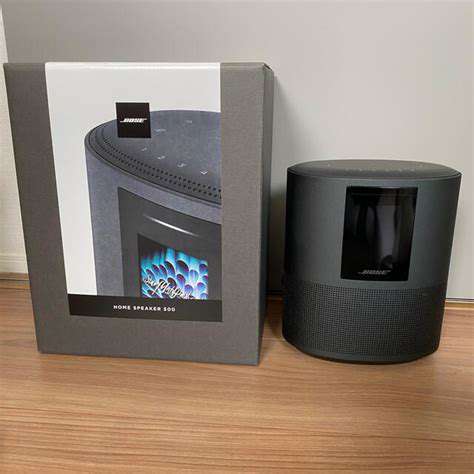
the Amazon Echo Dot (5th Generation), Google Nest Audio, Apple HomePod Mini, Sonos One, and Bose Home Speaker 500. Each speaker offers unique features and capabilities, catering to diverse user preferences and needs. Amazon Echo Dot (5th Generation)The Echo Dot (5th Generation) boasts a modern and compact design that fits seamlessly into any room. With improved audio performance, it delivers clearer vocals and enriched bass perfect for music lovers. This smart speaker excels in smart home integration, acting as a hub for various connected devices and making it easy to control your home environment with voice commands. Enhanced Alexa capabilities allow for a wide array of inquiries and reminders, while privacy features provide users peace of mind. Google Nest AudioWith a minimalist design, the Google Nest Audio stands out in aesthetics and sound quality. It features a 75mm woofer for impactful bass and crisp sound, making it a strong competitor in the market. Google Assistant offers intuitive voice interaction, enhancing the smart home experience by integrating with a multitude of devices. Multi-room audio support adds to its usefulness, allowing users to enjoy songs throughout their homes. Apple HomePod MiniApple's HomePod Mini combines elegant design with exceptional sound quality. This compact speaker utilizes advanced computational audio technology, delivering a rich audio experience tailored to the surrounding environment. As a smart home hub with Siri integration, users can control various smart devices, set reminders, and manage music playback effortlessly. The HomePod Mini prioritizes both form and function, making it an appealing choice for Apple ecosystem users. Sonos OneThe Sonos One excels in its audio performance, featuring rich bass and clear highs that outperform many competitors. It integrates well with both Amazon Alexa and Google Assistant, providing versatile voice control options. Its seamless setup process and compatibility with multiple music streaming services make it user-friendly. Additionally, the option to create a multi-room audio system enhances the listening experience, allowing for synchronized playback across various spaces. Bose Home Speaker 500The Bose Home Speaker 500 impresses with a sleek aluminum design and intuitive controls. Known for its exceptional sound clarity and deep bass, it features adjustable EQ settings for a customized audio experience. This speaker supports multi-room audio capabilities, enabling seamless music streaming throughout your home. With a premium build and exceptional performance, the Bose Home Speaker 500 is designed for discerning audiophiles. ConclusionChoosing the right smart speaker depends on your individual preferences and needs. Each of these devices—Amazon Echo Dot, Google Nest Audio, Apple HomePod Mini, Sonos One, and Bose Home Speaker 500—offers unique features that cater to different user backgrounds, whether you prioritize music quality, smart home integration, or design aesthetics. Consider your specific requirements to find the perfect blend of functionality and style for your home.
Feb 07, 2026
//example.com/static/images/25/2026-02/TheSymbioticRelationshipBetweenSoftwareandHardware.jpg) Understanding the Core of the RelationshipThe interplay between software and hardware is fundamental to modern computing technologies. Software acts as a bridge, converting hardware capabilities into meaningful applications that drive user experiences. For instance, as we've transitioned from traditional hard drives to solid-state drives (SSDs), software development has adapted to utilize these advancements for speed and efficiency. This historical evolution highlights a feedback loop where hardware innovations inspire software advancements, shaping entire ecosystems like mobile and cloud computing. The Role of Software in Hardware Optimization- Software enhances hardware capabilities through updates or new applications.- Optimized software improves performance and longevity of hardware components.- Continuous software development motivates regular hardware innovation.Software development plays a crucial role in optimizing hardware performance. Tailored algorithms help manage system resources effectively, ensuring efficient operation. Game developers, for example, create patches that enable new games to run on older consoles, showcasing the adaptability of software to existing hardware constraints. Future Trends: Co-evolution of Software and HardwareAs we look to the future, the relationship between software and hardware is expected to evolve, especially with rising trends in artificial intelligence (AI) and machine learning. Sophisticated software will drive hardware innovations, illustrated by the Internet of Things (IoT), where connected devices leverage software updates to enhance functionality and security. Performance Optimization Through Software Innovations![Performance Optimization Through Software Innovations](https://example.com/static/images/25/2026-02/PerformanceOptimizationThroughSoftwareInnovations.jpg) Understanding Software's Role in Hardware PerformanceIn today’s computing environment, software is crucial for unlocking the full potential of hardware. High-performance computing environments benefit from customized software solutions for efficient resource management, illustrating how software and hardware synergy enables significant performance improvements. Innovative Software Solutions Driving Efficiency- Dynamic resource management enhances utilization rates.- Adaptive algorithms respond to real-time performance metrics.- Efficient memory management techniques minimize latency.Innovative software solutions are essential for performance optimization, allowing systems to adapt to demanding workloads while maintaining high efficiency. Driving Hardware Innovation with New Software ParadigmsThe emergence of software-defined hardware (SDH) enables organizations to allocate resources dynamically, enhancing operational efficiency. About 70% of organizations are investing in SDH technologies, demonstrating the reliance on software to dictate hardware performance. This approach fosters collaborative development between software and hardware teams, leading to innovative solutions tailored to specific operational demands. The Future of Hardware: Integration with Software Trends![The Future of Hardware: Integration with Software Trends](https://example.com/static/images/25/2026-02/TheFutureofHardware3AIntegrationwithSoftwareTrends.jpg)Hardware development is now closely tied to software advancements; smart devices and AI capabilities are setting new performance standards. However, challenges remain regarding compatibility and security as systems grow increasingly complex. Organizations must stay proactive, investing in integrated solutions while fostering a culture of collaboration and innovation.---To stay competitive, businesses should prioritize ongoing training for software and hardware teams, ensuring they are prepared for emerging trends. Regular benchmarking and monitoring market demands will help organizations adapt and thrive, shaping a future defined by seamless software-hardware integration.
Feb 07, 2026
View Publication>>

Hot Recommendations