How to Choose the Right Router
The physical size of the router can impact both its performance and aesthetics. While many people lean toward compact models for their space-saving qualities, larger routers often come equipped with advanced technology that boosts performance and range. A bulky router can fit in better in spacious areas, offering additional features such as multiple antennas for improved signal distribution.
Moreover, some routers come with built-in mesh systems that are designed to work seamlessly with additional nodes spread throughout your home, enhancing coverage without the need for larger standalone devices. Assessing how much space you have available for the router is essential when making a purchase.
Lastly, consider ventilation and design—routers that run too hot could see performance degradation, making it necessary to choose designs that allow for adequate heat dissipation.
Wi-Fi Standards and Their Impact on Coverage
Different Wi-Fi Standards affect router performance and coverage area. The latest Wi-Fi 6 (802.11ax) technology offers not just faster speeds but also better efficiency and coverage capabilities compared to its predecessors. This means that even in crowded environments or homes with multiple devices, a Wi-Fi 6 router can maintain a robust signal.
When evaluating routers, check the specifications to ensure that the device supports the latest standards, as this information gives insight into its potential performance. Routers with backward compatibility to older standards also help if you have legacy devices, but make sure the primary focus is on current technology for optimal performance.
Furthermore, routers supporting Mesh technology can also offer improved coverage, seamlessly integrating several devices into one cohesive network and ensuring consistent connectivity throughout your living or workspace.
Environment and Router Placement
The environment in which the router is placed can significantly influence its performance. Factors like placement height, distance from other electronic devices, and wall materials can all impact signal quality. For instance, placing a router on a high shelf can enhance coverage by minimizing obstacles that block the signal.
Additionally, it’s advisable to keep routers away from microwaves and cordless phones as these appliances emit frequency interference that can disrupt the Wi-Fi signal. In specific settings, placing the router centrally can ensure maximum distribution; however, exploring the topology of your space can help you identify critical areas that require stronger signals.
Assessing User Needs with Smart Features
Modern routers often come equipped with smart features that can cater to specific user needs. Features such as Quality of Service (QoS) prioritize bandwidth allocation for devices that need it the most, which is particularly beneficial in homes with heavy gaming or streaming activities. If you frequently experience lag during video calls or gaming, consider routers with advanced QoS settings.
Moreover, security features such as automatic firmware updates and built-in firewalls enable safer browsing experiences, making them vital for homes with multiple users. The ability to manage parental controls is also essential if you have children, as it allows you to regulate online time and access to certain content. In essence, assessing your lifestyle and requirements will help you find a router with the right set of smart features.
3. Prioritize Speed and Performance Features
Understand Throughput and Speed Ratings
When choosing a router, it's crucial to understand its speed specifications. Look for products that clearly indicate their throughput ratings, such as 802.11ac or Wi-Fi 6, which can significantly impact your internet experience. For instance, Wi-Fi 6 routers can provide speeds up to 9.6 Gbps, compared to the maximum 3.5 Gbps of 802.11ac. This higher throughput can support more devices without compromising performance.
Moreover, it’s essential to consider both the theoretical maximum speeds and real-world performance. Many routers advertise impressive speeds, but actual performance can often be lower due to factors like distance from the router and interference. Checking reviews and user experiences can provide practical insights into how a router operates under everyday conditions.
Additionally, it's advisable to consider the number of bands a router has. Dual-band or tri-band routers offer more flexibility and better management of traffic. By segmenting devices across multiple bands, you can prevent bottlenecks and ensure a smoother experience overall.
Evaluate Latency and Connection Stability
Latency is another critical factor to assess when prioritizing performance in a router. High latency can lead to delays that affect activities like online gaming or video conferencing. A good router should keep latency levels low, typically ideal under 20 milliseconds. This measure is crucial for seamless user experiences.
Moreover, connection stability should not be overlooked. Look for routers that support features like Quality of Service (QoS) to prioritize bandwidth for specific applications or devices. This ensures that video calls and gaming maintain optimal performance, even when other devices are consuming internet bandwidth.
Research shows that mesh networks might offer solutions for larger homes where connectivity issues occur due to distance from the router. Mesh systems provide multiple nodes that create a blanket of Wi-Fi coverage, limiting dead zones, which in turn enhances the overall connectivity experience.
Consider Future-Proofing with Advanced Technology
Future-proofing is an important consideration when selecting a router. Technology is constantly evolving, and opting for routers that support the latest standards can save you from premature obsolescence. For example, devices that support Wi-Fi 6 or even upcoming Wi-Fi 7 technology will ensure compatibility with newer devices for years to come.
Another key aspect of future-proofing is looking for routers equipped with advanced security features. Security protocols like WPA3 can provide enhanced protection against unauthorized access, aligning with the growing concerns about data privacy and network security. As the number of connected devices increases, robust security becomes increasingly vital.
Additionally, consider routers that offer customizable firmware options. Open-source firmware can provide more control over your network settings, allowing tech-savvy users to customize performance and security features to better fit their needs. This is especially important in households with numerous smart devices that require tailored network management.
4. Evaluate Security Features
1. Importance of Firewall Protection
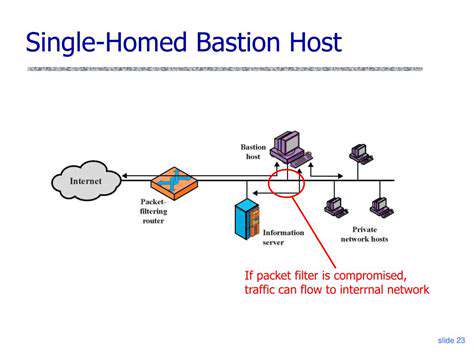
One of the critical security features to look for in a router is its built-in firewall. A firewall acts as a barrier that filters out harmful traffic before it reaches your devices, preventing unauthorized access. Research indicates that routers with advanced firewall capabilities can reduce the risk of hacking attempts. As a rule of thumb, ensure that the router you choose has at least a stateful packet inspection (SPI) firewall to enhance your network's security posture.
Additionally, many routers now come with integrated Intrusion Detection and Prevention Systems (IDPS) which actively monitor and block potential threats. This feature is especially vital for homes with multiple devices connected, as it adds a layer of real-time protection. If you’re serious about safeguarding your home network, prioritize routers equipped with robust firewall solutions to mitigate security risks effectively.
2. WPA3 Encryption Standards
When evaluating router security, one cannot overlook the significance of encryption methods. The latest standard, WPA3, provides stronger security than its predecessor, WPA2. WPA3 is designed to offer better protection against brute-force attacks and assures users that their data is encrypted even on open networks. A study by the Internet Engineering Task Force (IETF) shows that switching to WPA3 can significantly enhance network security, making it more resilient to exploitation.
3. Automatic Security Updates
An essential but often overlooked feature of routers is their ability to receive automatic firmware updates. These updates are crucial as they patch vulnerabilities that could be exploited by cybercriminals. Many manufacturers release periodic updates that improve security measures and functionalities, which may require manual checks if the router lacks automatic capabilities. Investing in a router with this feature can save you time and ensure your network remains secure without requiring constant vigilance.
Moreover, some routers offer a companion app that notifies users when updates are available. This proactive approach allows you to monitor your device’s security status without needing extensive technical know-how, ensuring that even less tech-savvy individuals can maintain a secure network environment. Always check for this feature when selecting a network device.
4. Guest Network Functionality
Another important feature to consider is the capability to create a separate guest network. This function allows visitors to access the internet without compromising your primary network's security. Instead of sharing your main Wi-Fi password, a guest network isolates guest devices from your personal files and devices. This not only enhances security but also improves your network performance by preventing unauthorized devices from consuming bandwidth.
In fact, a survey conducted by the Wi-Fi Alliance shows that routers with guest access options are preferred by users for both convenience and security. Enabling this feature is a simple yet effective way to protect your sensitive information while still allowing others to connect to your internet. Make it a point to look for routers that prominently feature easy-to-set-up guest networks.
5. Read Reviews and Compare Prices

Understanding Product Reviews: What to Look For
- Focus on the credibility of the reviewer.
- Check for common themes in reviews regarding performance.
- Look for recent reviews to ensure the router's updates are accounted for.
When reading reviews, it's essential to assess the Credibility of the reviewer. Reviews from verified buyers often carry more weight due to their firsthand experience with the product. Understanding who is reviewing the product can help you gauge if their needs and expectations align with yours, making their feedback more relevant.
Another critical aspect is identifying common themes among reviews. If multiple users highlight issues with speed or connectivity, it might raise red flags about the router's reliability. Comparatively, consistent praise for setup simplicity could point to its user-friendliness, which is often a deciding factor for many consumers.
Price Comparison: Best Practices for Smart Shopping
Price comparison is a crucial step in selecting the right router. Armed with data from multiple retailers, you should never pay more than necessary. Make use of tools like online price comparison websites and apps that aggregate pricing across multiple sellers at once. This can lead to significant savings and ensure you’re really getting the best bang for your buck when purchasing your router.
Also, consider checking for sales events such as Black Friday or Cyber Monday when router prices might drop significantly. Timing your purchase strategically can result in considerable discounts. Additionally, while it's tempting to go for the cheapest option available, ensure you're not compromising on essential features that meet your specific internet needs.
Read more about How to Choose the Right Router