Best Tablets for Productivity Reviewed
Performance and Specifications
The Apple iPad Pro is equipped with the M1 chip, which significantly enhances its processing power compared to previous models. This chip allows for seamless multitasking and speedy execution of demanding applications, making it ideal for professionals who require high performance for tasks such as video editing or graphic design. In fact, benchmarks show that the iPad Pro can outperform many traditional laptops, showcasing its capability as a productivity tool.
With up to 2TB of storage and a Liquid Retina XDR display, users will experience stunning visuals and ample space for files, apps, and multimedia projects. Additionally, the ProMotion technology ensures smooth scrolling and responsiveness, which can be crucial during intensive tasks. The device also supports the Apple Pencil and Magic Keyboard, enhancing its versatility for creative professionals.
Software and Usability
The iPad Pro runs on iPadOS, which has evolved to include features tailored for productivity users. This operating system allows for true desktop-class applications, making it easier to handle work-related tasks on the go. The Split View and Slide Over functionalities enable efficient multitasking, letting users operate two apps simultaneously without losing focus.
Battery Life and Portability
One of the standout features of the Apple iPad Pro is its Impressive battery life, lasting up to 10 hours of continuous use. This longevity makes it a reliable companion for professionals who work remotely or travel frequently. With its lightweight design, the iPad Pro is easy to carry, fitting comfortably into any briefcase or bag, capitalizing on convenience without sacrificing performance.
Microsoft Surface Pro 9: A Laptop Replacement
Performance and Specifications
The Microsoft Surface Pro 9 is equipped with a formidable Intel Core i5 or i7 processor, allowing it to handle demanding applications with ease. This level of performance can significantly enhance productivity, especially for professionals who use resource-intensive software for tasks such as graphic design or video editing. Moreover, coupled with up to 32 GB of RAM, users can multitask seamlessly, reducing any frustrating lag that might occur when switching between applications.
In addition to its powerful processors, the Surface Pro 9 boasts SSD storage options of up to 1 TB, ensuring that users have ample space for documents, applications, and media files. This type of storage not only offers speed but also enhances the overall user experience by allowing for quick file retrieval. Overall, the specifications of the Surface Pro 9 clearly indicate a strong capability to not just replace traditional laptops, but in many cases, outperform them.
Design and Usability Features
When it comes to design, the Microsoft Surface Pro 9 presents a sleek and lightweight profile, making it highly portable and easy to work with in various environments, from coffee shops to conference rooms. Its 13-inch PixelSense touchscreen provides vibrant, clear visuals, which will appeal to professionals who rely on graphic elements in their work. Furthermore, the included kickstand allows for flexible positioning, making it easier for users to find their optimal viewing angle.
Additionally, the Surface Pro 9 includes features tailored for smooth user interaction, such as the Surface Slim Pen 2 compatibility. This accessory not only enhances note-taking and sketching but also minimizes the distance between the hand and screen, providing a comfortable writing experience. From my perspective, this combination of design and usability features makes the Surface Pro 9 an exceptional choice for any professional seeking a versatile computing solution.
Samsung Galaxy Tab S8 Ultra: A Multitasker's Dream
Design and Display Quality
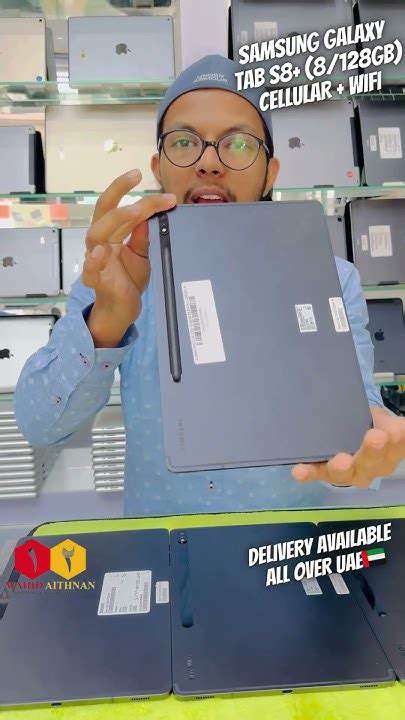
The Samsung Galaxy Tab S8 Ultra showcases an impressive design that appeals to both professionals and casual users. Its large 14.6-inch Super AMOLED display offers vibrant colors and deep contrast, making it ideal for multimedia tasks. The wide aspect ratio enhances productivity, allowing users to comfortably view multiple apps side by side.
This tablet features a sleek aluminum chassis, exuding sophistication and durability. The ultra-slim bezels surrounding the screen maximize display area while maintaining an ergonomic grip, making long working hours less tiresome.
Performance and Software Capabilities
Powered by the Snapdragon 8 Gen 1 processor, the Galaxy Tab S8 Ultra significantly improves multitasking capabilities. With 12GB or 16GB of RAM available, this tablet easily handles demanding applications and large files without any lag. This performance is a game-changer for users who often juggle multiple tasks.
- Exceptional speed and responsiveness
- Seamless multitasking with split-screen and pop-up features
- Enhanced graphics support for gaming and creative work
The device runs on Android 12, paired with Samsung's One UI 4.1, providing a user-friendly interface that enhances productivity. Customization options allow users to personalize their experience, reflecting individual work styles.
Battery Life and Charging Options
The Samsung Galaxy Tab S8 Ultra comes equipped with a robust 11,200mAh battery, designed to last through an entire day of intense use. Users can expect around 14 hours of mixed usage, ranging from browsing to content creation. This Prolonged battery life means you won't be scrambling for a charger during important tasks.
Additionally, it supports fast charging via USB-C, allowing users to quickly power up and get back to work. This feature is especially handy for busy professionals or students who need a quick recharge between classes or meetings.
Accessories and Productivity Features
What sets the Galaxy Tab S8 Ultra apart is its compatibility with a range of productivity accessories. The S Pen stylus comes included, offering a natural writing experience for note-taking and sketching. Users appreciate the low latency and high precision, making it ideal for creatives and professionals alike.
- Versatile keyboard cover for enhanced typing speed
- S Pen for drawing and note-taking
- DeX mode transforms the tablet into a PC-like experience
The addition of the Book Cover Keyboard is a perfect companion for those who want to replicate laptop functionality. With its trackpad, it improves navigation and enhances the overall workflow.
Connectivity and Collaboration Features
The Galaxy Tab S8 Ultra offers extensive connectivity options, including Wi-Fi 6E and 5G support on selected models. This level of connectivity enables users to enjoy fast internet speeds, crucial for video conferencing and collaborative tasks. This feature is especially important for remote workers and teams that rely on cloud services.
Samsung's ecosystem also provides seamless integration with other devices, allowing users to share files easily and receive notifications across platforms. The collaboration tools within apps like Microsoft Office enhance teamwork, making this tablet a solid choice for business environments.
On the other hand, secondary headaches are symptoms of another medical condition. For instance, sinus infections, high blood pressure, or even an injury can trigger this type of headache. Understanding the distinction between these two types is crucial as it influences how they are treated.
Lenovo Tab P12 Pro: Affordable Versatility
Key Features of the Lenovo Tab P12 Pro
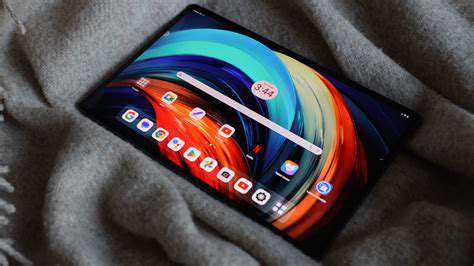
The Lenovo Tab P12 Pro is equipped with a stunning 12.6-inch AMOLED display that offers vibrant colors and sharp contrast, making it an excellent choice for both work and entertainment. This high-resolution screen delivers an immersive viewing experience, ideal for tasks that demand visual accuracy. Additionally, the tablet supports HDR10+ content, which enhances the quality of videos and images you consume.
Performance-wise, the device is powered by the Qualcomm Snapdragon 870 processor, ensuring that it can handle multitasking with ease. The combination of 8GB RAM and up to 256GB storage means you won’t have to worry about lagging during demanding applications.
Software and Usability
Running on Android 11, the Lenovo Tab P12 Pro offers a user-friendly interface that integrates seamlessly with Google services and applications. One notable feature is its support for Lenovo's productivity suite, which enhances task management and organization. This makes it suitable for both personal use and professional environments.
The Lenovo ThinkPad keyboard that can be purchased with the tablet greatly enhances its usability for typing tasks, making it a versatile option for remote work or studying.
Moreover, the addition of Lenovo's Precision Pen 3 allows for intuitive drawing and note-taking, converting the device into an effective creative tool that stands out in its class.
Battery Life and Charging
The Lenovo Tab P12 Pro boasts a remarkable battery life of up to 14 hours on a single charge, which is quite impressive for a device of its capabilities. This is essential for users who require longevity, especially in a professional setting where being tethered to a power outlet is not an option.
Accompanying this feature is the fast charging capability, allowing the device to recharge quickly. With a 30-minute charge, users can gain several hours of use, ensuring productivity doesn’t come to a halt due to low battery.
Audio and Visual Experience
In terms of audio, the Lenovo Tab P12 Pro is fitted with quad speakers that deliver an expansive sound experience. This enhances media consumption, making it an excellent option for streaming videos or attending virtual meetings. The presence of Dolby Atmos technology takes the audio experience a step further, and listeners will appreciate the clarity and depth this feature brings.
From an audio-visual perspective, the combination of high-definition visuals and superior audio quality makes this tablet stand out amongst its competitors. This is ideal for users who enjoy consuming media or engaging in video calls.
Affordability and Value for Money
- The Lenovo Tab P12 Pro is competitively priced compared to other tablets offering similar features.
- It offers high-end specifications without breaking the bank, making it an attractive option for budget-conscious consumers.
- The availability of accessories like the keyboard and stylus further enhances its value, allowing customization based on user needs.
When evaluating devices within the same price bracket, the Lenovo Tab P12 Pro consistently delivers superior performance and functionality. It's a pragmatic choice for individuals looking to maximize their investment in a multifunctional tablet.
Comparison with Competing Devices
In the current market, several tablets vie for the attention of productivity-focused users. When comparing the Lenovo Tab P12 Pro with devices such as the Samsung Galaxy Tab S7 and the Apple iPad Pro, it holds its ground well. The Lenovo tablet provides a well-rounded experience, considering its price point and the features it delivers.
While the iPad Pro has a more extensive ecosystem of applications, the Tab P12 Pro wins in affordability. Plus, for many users, particularly those who use Android devices, the transition is seamless and user-friendly.
Final Thoughts and Recommendations
Overall, the Lenovo Tab P12 Pro emerges as a strong contender in the tablet market. It offers a perfect blend of performance, usability, and affordability, making it suitable for diverse groups of users—from students to professionals.
For anyone in search of a Robust tablet that can support productivity without exceeding budget constraints, the Lenovo Tab P12 Pro is highly recommended. It’s a smart investment for those wanting versatile technology at their fingertips.
Read more about Best Tablets for Productivity Reviewed


![Top Browser Extensions for Chrome & Firefox [2025]](/static/images/25/2025-05/OptimizingYourBrowsingExperiencewithCustomizationandEfficiency.jpg)


Hot Recommendations
- The Role of AI in Consumer Electronics
- Smart Speakers Reviewed
- Future of Wireless Networking
- Best Gaming Accessories for Competitive Play
- Laptops for Programming Compared
- Headphones vs Earbuds: Which Should You Buy
- Gaming Mice Compared: Sensors and Ergonomics
- Best Displays for Movies and Series
- Console vs PC Gaming: Which Is Better
- Best Budget Laptops for Students and Professionals