Laptop Display Technologies Explained
Understanding LCD Technology
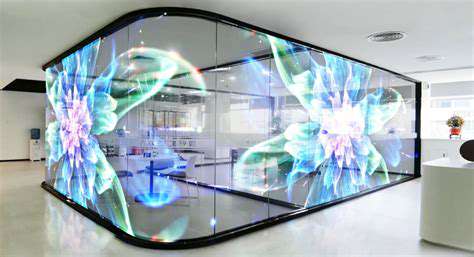
Liquid Crystal Display (LCD) technology utilizes a backlight, typically composed of fluorescent or LED lights, to illuminate the screen. This method provides a level of Brightness and color accuracy that has made LCDs popular for various applications. In an LCD, liquid crystals manipulate light, allowing for the display of images and text with impressive clarity.
One significant advantage of LCDs is their thin form factor, making them an ideal choice for laptops and monitors where space is a premium. Additionally, the innovative use of polarizers and color filters helps achieve desired visual outputs while maintaining energy efficiency. As a result, LCD screens generally consume less power compared to traditional CRTs, which leads to longer battery life in laptops.
Exploring LED Technology
Light Emitting Diode (LED) displays represent a more modern approach to screen technology. While technically a sub-category of LCDs, LED displays use semiconductor materials that emit light when an electric current passes through. This technology allows for improved brightness and contrast levels, providing a more vibrant viewing experience. LEDs also come in two primary types: edge-lit and backlit, each with unique benefits and drawbacks.
- Edge-lit displays are thinner and more energy-efficient.
- Backlit displays generally offer better color accuracy and uniform brightness.
- LEDs have a significantly longer lifespan than LCDs, reducing the frequency of replacements.
Furthermore, LED technology enables better color saturation, particularly in high-definition formats. For users who prioritize image quality, investing in an LED display could elevate their experience when utilizing multimedia applications, such as gaming or film-watching.
Comparative Analysis: LCD vs. LED
When it comes to choosing between LCD and LED displays, understanding their differences can significantly impact your decision. Firstly, price is a major factor, as LED displays are typically more expensive due to their advanced technology and manufacturing processes. While LCDs do provide decent performance for basic tasks, those seeking superior quality may find that the investment in an LED display pays off in long-term satisfaction.
Another aspect to consider is energy consumption. While both technologies have made strides in efficiency, LEDs tend to consume less power compared to traditional LCD setups. This means lower energy bills and a smaller carbon footprint over time. For eco-conscious users or businesses, opting for LED displays aligns with sustainability goals without compromising on performance.
In conclusion, the decision between LCD and LED should be informed by specific user needs, budget considerations, and intended usage—but opting for LED displays could yield significant benefits in terms of quality and efficiency. Whether for casual use or professional applications, evaluating the features and specifications thoroughly ensures a well-informed choice.
IPS vs. TN Panels: Color and Viewing Angles
Understanding IPS Technology
In-Plane Switching (IPS) technology is recognized for its superior color reproduction and wide viewing angles. Unlike traditional Twisted Nematic (TN) panels, IPS displays present consistent image quality regardless of the viewer's angle. This is particularly beneficial for graphic designers and photographers who require precise color fidelity when editing images.
Furthermore, IPS panels generally offer more luminous performance. Research shows that an IPS monitor can achieve color accuracy exceeding 90% of the sRGB color space, making them suitable for professional use. These specifications help users make more informed decisions when selecting a laptop for demanding tasks such as digital content creation.
The Limitations of IPS Displays
While IPS panels are popular for their advantages, they're not without drawbacks. One notable limitation is response time. Typically, IPS panels have slower response times compared to TN displays, which can result in motion blur during fast-paced gaming. Gamers who prioritize refresh rates and low latency might find that TN Panels serve their needs better despite poorer color accuracy.
TN Panel Advantages
Twisted Nematic (TN) panels still hold a relevant place in the market, especially for budget-friendly laptops. They often boast quicker response times, allowing for fluid motion and minimal ghosting, which is crucial in competitive gaming. Additionally, their lower manufacturing costs translate to more affordable display options without compromising on performance for many general tasks.
Moreover, recent developments have led to TN panels featuring enhanced color quality, narrowing the gap between them and IPS panels. Users looking for a laptop primarily for tasks such as browsing or casual gaming may find TN panels provide satisfactory performance, making them a pragmatic choice.
Choosing the Right Technology for Your Needs
When deciding between IPS and TN panels, it's essential to consider your primary use case. For professional graphic work, an IPS display's superior color accuracy and viewing angles are hard to beat. If gaming or casual use is at the forefront, the quicker response times of TN panels may be more beneficial.
Ultimately, the choice hinges on individual preferences. Buyers should reflect on their specific needs, be it color fidelity, speed, budget, or usage scenarios, to determine which panel type aligns best with their requirements. Personal experience often plays a pivotal role in making this decision, as some users may prioritize visual quality while others may focus on performance metrics.
OLED Displays: The Future of Laptop Screens
Understanding OLED Technology
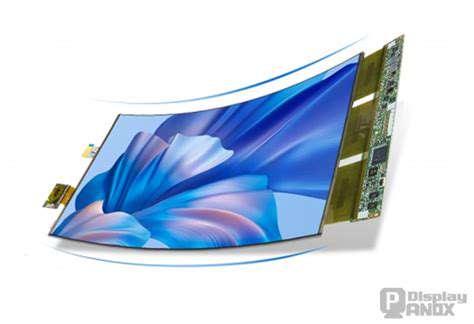
OLED, or Organic Light Emitting Diode, represents a major advancement in display technology. Unlike traditional LCD screens, which require a backlight, OLED displays emit their own light. This results in deeper blacks and a broader color spectrum. This Self-lighting capability is what makes OLED screens particularly appealing for laptops and portable devices.
Each pixel in an OLED screen can be turned on or off independently, allowing for exceptional contrast ratios and improved energy efficiency. This technology not only enhances image quality but also delivers vivid colors that are ideal for graphic design, gaming, and multimedia consumption.
Comparing OLED with Other Display Technologies
- OLED vs. LCD: OLED offers better contrast and color accuracy.
- OLED vs. QLED: QLED uses quantum dots but lacks the true blacks of OLED.
- OLED lifespan: It's important to note that OLED displays can suffer from burn-in.
When comparing OLED with traditional LCD screens, the differences are stark. While LCDs might provide value and lower cost, they cannot match the dynamic range and viewing angles of OLEDs. Moreover, OLED's ability to render true blacks comes from its pixel-level lighting, which is a game-changer in creating immersive experiences.
In contrast, QLED technology, which is based on quantum dots, has gained traction for its brightness and color volume. However, QLED remains at a disadvantage with dark scenes where OLED excels. Understanding these differences is essential for consumers looking to make an informed choice about their display technology.
The Impact of OLED on Battery Life
The energy efficiency of OLED displays has significant implications for laptop battery life. Since OLED screens illuminate individual pixels, dark images consume less power compared to their brighter counterparts. This feature can be particularly beneficial for users who primarily work with text or dark-themed applications.
Studies have shown that, depending on usage patterns, laptops with OLED displays can extend battery life by up to 30%. This reduces the need for frequent recharging, allowing users to work more flexibly without constantly worrying about finding a power outlet.
Applications of OLED Displays in Laptops
OLED technology has started to dominate various applications in laptops, especially for professionals such as graphic designers and photographers. They require displays with excellent color accuracy and clarity for their work. OLED's broad color gamut and contrast help in precisely editing images and creating high-quality visual projects.
Additionally, gamers benefit from the stunning visuals offered by OLED screens. The technology provides faster response times and refresh rates that enhance the gaming experience. As more models become available, the demand for OLED-enabled laptops continues to increase.
Challenges and Considerations of OLED Displays
Despite the numerous advantages, OLED displays are not without their challenges. One of the primary concerns is the potential for burn-in, which can occur when static images are displayed for extended periods. This can result in ghosting effects on the screen, which might be troubling for users who often multitask with multiple windows.
However, manufacturers are now developing technologies to mitigate these risks, providing solutions like pixel shifting and screen savers. It’s essential for potential buyers to weigh these concerns against the dramatic display improvements OLED offers.
Future Developments in OLED Technology
The future of OLED technology in laptops looks promising, with ongoing research focused on improving longevity and reducing costs. Companies are innovating in ways to enhance OLED's durability and minimize burn-in effects, which could broaden market adoption.
In addition, advancements in flexible OLED technology could lead to foldable laptop designs, transforming the way we perceive portable computing. As these developments materialize, we can expect OLED displays to become a standard feature in the laptop market.
High Refresh Rate Displays: Boosting Gaming Experience

Understanding Refresh Rates
Refresh rate, measured in hertz (Hz), indicates how many times a display updates per second. For instance, a 60Hz display refreshes the image 60 times a second, while a 144Hz display does so 144 times. Higher refresh rates lead to smoother motion and more responsive gameplay. This is particularly crucial in fast-paced gaming genres like first-person shooters and racing games, wherein split-second reactions can make the difference between victory and defeat.
As gamers push their hardware with graphically intense applications, the importance of refresh rates becomes even more pronounced. With the advent of 240Hz and even 360Hz displays, players can experience unprecedented levels of smoothness, vastly reducing motion blur and ghosting. Many competitive gamers now consider 144Hz as a baseline for serious gameplay, pointing to tangible performance improvements in their skills.
The Impact of Refresh Rate on Visual Experience
- A higher refresh rate contributes to a more immersive gaming experience.
- Visual clarity and fluidity can be game-changing in competitive scenarios.
The visual experience provided by high refresh rate displays cannot be overstated. A 144Hz or 240Hz display can change how games appear and feel, drastically enhancing the immersion. Players report feeling more in control, particularly in competitive settings where every frame counts. The difference can be especially stark when switching between a standard 60Hz monitor and a high refresh rate alternative.
In addition, many gaming monitors come equipped with technologies like NVIDIA G-Sync or AMD FreeSync, which further optimize the gaming experience by synchronizing the refresh rate with the graphics card's output. This prevents screen tearing and stuttering, ensuring that gamers enjoy their titles in the best possible quality and performance.
Touchscreen Displays: Practicality Meets Usability
Understanding Touchscreen Technology
Touchscreen technology has evolved significantly since its inception. The most common types of touchscreens include resistive and capacitive displays. Resistive touchscreens work by sensing pressure on the screen, which generally requires you to use a stylus or your finger to make contact. On the other hand, capacitive screens sense the electrical conductivity of the human touch. Consequently, these screens often enable gestures like pinch-to-zoom and swipe, enhancing user interaction.
Moreover, multi-touch technology has made it possible for users to interact with the device using multiple fingers simultaneously. This advancement has propelled touchscreen devices into mainstream usage, making them essential for laptops, tablets, and smartphones alike. According to a recent survey, over 70% of laptop users prefer touchscreen devices, citing improved efficiency in navigation and multitasking.
Benefits of Touchscreen Displays
The Primary advantage of touchscreen displays is ease of use. These screens eliminate the need for a mouse and keyboard, allowing users to access applications and files directly with their fingertips. This can lead to a more intuitive and faster interaction process, particularly for individuals who are not as tech-savvy. Educational environments, for example, benefit significantly from touchscreen displays as they facilitate interactive learning.
Another benefit is space-saving efficiency; touchscreen devices often have a more compact design, making them suitable for environments with limited workspace. Users can easily switch between applications, browse the web, and even draw or sketch, making touchscreen displays versatile and practical for various settings, including professional and personal usage.
Touchscreen Durability and Maintenance
When investing in touchscreen displays, it’s essential to consider their durability. Most modern touchscreens are built with scratch-resistant glass and protective coatings, which help withstand daily wear and tear. Despite this, they still require maintenance to keep them functioning optimally. Regular cleaning with appropriate microfiber cloths and screen-safe cleaning solutions is advisable to maintain clarity and responsiveness.
Moreover, some manufacturers offer devices with gorilla glass or similar materials to enhance durability even further. However, it’s important to understand that extended exposure to harsh chemicals or excessive pressure can damage the screen. Users should follow the manufacturer’s instructions regarding care and maintenance to extend the lifespan of touchscreen technology.
Applications in Various Industries
Touchscreen technology has found applications across multiple sectors, including healthcare, retail, and gaming. In healthcare, touchscreens are utilized for patient records, medical imaging, and even robotic surgeries. The ability to quickly access comprehensive information directly from a device promotes efficiency and accuracy in treatments.
In retail, touchscreen displays enhance customer experience by allowing for interactive product displays and transaction processing. Digital kiosks equipped with touchscreens make it easier for customers to find what they need, check prices, and even place orders. The gaming industry also leverages touchscreen technology, developing innovative arcade games that require player interaction directly on the machine.
Choosing the Right Touchscreen Display for Your Needs
Selecting an ideal touchscreen display boils down to understanding your specific needs. Factors such as screen size, resolution, and type of technology (resistive vs. capacitive) need to be evaluated. For instance, users who frequently engage in graphic design might prioritize high-resolution display and color accuracy, while casual users may focus on basic functionality.
Another consideration is the intended environment. Touchscreens used in outdoor settings or industrial applications may require additional features such as enhanced visibility in bright light or increased durability against heavy use. Always assess how the device will be used to make an informed decision that aligns with your requirements.
Future Trends in Touchscreen Technology
Touchscreen technology is poised for exciting advancements. Innovations such as haptic feedback, which provides tactile responses for interactions, are gaining traction. This technology could vastly improve user experience by making interactions feel more natural, thereby attracting more consumers to touchscreen devices.
Additionally, the integration of AI and machine learning into touchscreen systems is expected to enhance usability further. Touchscreens could learn user behavior, adapting interfaces and optimizing interactions based on past usage patterns. The aim is to create an environment that not only meets current demands but is also prepared for future developments.
Personal Insights and Recommendations
As a professional in this field, I believe that investing in touchscreen technology is a smart move. It not only streamlines operations but also enhances user satisfaction. However, it's crucial to stay updated on the latest innovations and trends to make informed purchasing decisions.
Additionally, always consider the warranty and support options provided by manufacturers. Since touchscreens can vary drastically in quality, a reliable warranty can protect your investment and offer peace of mind. I recommend conducting thorough research and reading customer reviews to ensure you're selecting a device that suits your specific needs while offering robust performance.
Read more about Laptop Display Technologies Explained
![Best Password Managers Compared [Security & Features]](/static/images/25/2025-05/AdditionalFeaturesandUserExperience.jpg)




![Review: The Newest Smart Thermostats [Energy Saving & Features]](/static/images/25/2025-07/ExploringtheLatestSmartThermostatModels.jpg)





Hot Recommendations
- 4K vs 1440p Monitors: Which Should You Buy
- Best Wireless Earbuds Compared
- How Chip Technology Is Evolving
- How to Read and Trust Tech Reviews
- Smartphone Storage Technologies Explained
- How Laptop Specs Affect Real Performance
- Real World Applications of Computer Vision
- Noise Canceling Earbuds vs Headphones
- True Wireless Earbuds Buying Guide
- Best Earbuds for Calls and Online Meetings