NAS
Data Management
Data Backup
Performance
Specifications
Backup Solutions
Storage
User Experience
Design

Best NAS Devices for Home Users

A Step-by-Step Guide

Setting up a NAS device can seem daunting, but a straightforward plan can make it smoother. Begin by selecting a suitable location with good ventilation for your NAS to avoid overheating. Ensure it connects to a reliable power source and is wired directly to your router for optimal performance.

Once this is done, install your hard drives according to the manufacturer's instructions. Most NAS devices have step-by-step guides to assist you, so carefully follow these instructions to prevent any errors. After hardware installation, connect the NAS to your network and access its setup interface through a web browser to configure your device settings.

Take your time in configuring the user accounts and sharing permissions, tailoring them to household needs. Properly setting these aspects ensures a functional and secure environment for all potential users.

NAS Software and Application Ecosystem

The software ecosystem of a NAS can significantly influence its usability. Most brands offer an intuitive operating system that includes file management, multimedia streaming, and backup applications. Synology's DiskStation Manager, for example, is highly rated for its User-Friendly Interface and comprehensive features, which allow users to manage files easily and access them remotely.

Moreover, look into third-party applications available through the NAS app store. These can vary from surveillance applications for security monitoring to office productivity tools. The right combination of applications can transform your NAS into a multifunctional hub tailored to your household's specific needs.

Backup Solutions and Disaster Recovery

A reliable NAS device isn’t just about storage, but also ensuring your data remains safe. Many high-quality NAS units offer automated backup solutions, which can back up your important files to the cloud or replicate them to another NAS device. This dual-layered approach offers peace of mind and safeguards against hardware failures or accidental deletions.

Consider using external cloud services along with your NAS for enhanced data protection. Services like Amazon S3 or Google Drive can be configured to keep redundant copies of your files, ensuring you're prepared for any eventuality, such as natural disasters or theft.

Future-Proofing Your NAS Investment

As technology continues to evolve, ensuring your NAS device remains relevant and functional should be a priority. When choosing a device, opt for models that support the latest connectivity standards such as Wi-Fi 6 and 10GbE. These features not only enable faster data transfer speeds but also allow better integration with modern devices and networks.

Additionally, check if the manufacturer provides regular firmware updates. Keeping your NAS up to date with the latest security patches and features is crucial in maintaining performance and safeguarding your data. Investing in a NAS recognized for its longevity can often save money in the long run.

1. Synology DS220+
1.SynologyDS220+

1. Overview of Synology DS220+

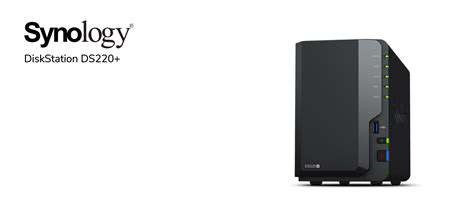
The Synology DS220+ is a two-bay NAS device that stands out for its user-friendly interface and powerful hardware. It is designed to meet the needs of home users, offering a balanced combination of performance and functionality. With its capability for RAID configurations, it provides data redundancy and maximizes storage efficiency.

Equipped with an Intel Celeron J4025 processor and up to 6GB of RAM, the DS220+ can handle multiple tasks simultaneously. This makes it suitable for applications ranging from media streaming to file sharing, serving as a reliable storage solution for small homes or offices.

2. Key Features

  • Two drive bays supporting both HDD and SSD formats.
  • Real-time transcoding support for video formats.
  • User-friendly DiskStation Manager (DSM) interface.
  • Robust app ecosystem including backup and multimedia applications.

One of the standout features of the DS220+ is its Real-time transcoding capabilities, allowing users to stream 4K content seamlessly on various devices. This feature is a game-changer for families with multiple devices needing access to high-quality media. Additionally, its robust app ecosystem enables home users to customize their NAS experience extensively.

3. Setup and Installation

Setting up the Synology DS220+ is straightforward, thanks to its excellent setup guide. After plugging it in and connecting it to your network, users can use the Synology Assistant tool to find the NAS easily. The process typically takes less than 30 minutes, making it accessible even to those who are not tech-savvy.

During the setup, users can choose their RAID configuration based on storage needs and redundancy preferences. Options include SHR (Synology Hybrid RAID), which is recommended for easy management and flexibility in adding drives later on. This flexibility is crucial for accommodating future storage expansions without complex reconfigurations.

4. Performance Metrics

Performance is vital for any NAS device, and the DS220+ excels with impressive read/write speeds. In real-world tests, it achieves read speeds of around 112 MB/s and write speeds of up to 110 MB/s when configured with dual drives in RAID 1. These figures make it one of the more efficient choices for home networking, ensuring smooth data transfers even with multiple users accessing the device simultaneously.

Additionally, the processor allows for efficient multitasking. Running multiple applications, such as cloud syncing or media streaming, does not significantly impact its performance, a testament to its robust hardware architecture. This performance aspect is particularly beneficial for families that rely on their NAS for everyday tasks, ensuring that everyone can access their data without hiccups.

5. Software and User Experience

The Synology DSM software is often heralded as one of the best NAS operating systems available. Its interface is intuitively designed, making it easy for users to navigate through various settings, applications, and file management options. The application center offers numerous apps that enhance productivity, such as Synology Drive for file syncing and Synology Moments for photo management.

User experience is significantly enhanced by the frequent updates to DSM, which introduce new features and improve existing functionalities. Many users report favorable impressions because the system is not only powerful but also tailored to encourage engagement and enhance productivity, making it adaptable to various needs.

6. Connectivity Options

Connectivity is essential for any NAS device, and the DS220+ comes equipped with two Gigabit Ethernet ports, which can be configured for Link Aggregation. This ensures optimized bandwidth and failover capabilities, providing greater reliability and speed for users with demanding data transfer needs. Additionally, it features multiple USB 3.0 ports for direct connection of additional storage devices or printers, enhancing its versatility.

For home users, this means that expanding functionality is straightforward, eliminating the need for complicated setups. The device can seamlessly integrate into existing home networks, ensuring a smooth experience when accessing files from various devices, whether it's a laptop, smartphone, or smart TV.

7. Final Thoughts and Recommendations

The Synology DS220+ emerges as an excellent choice for home users requiring a balance of performance, ease of use, and versatile features. Its ability to handle tasks ranging from multimedia streaming to secure file storage sets it apart in the NAS market. If you're considering a NAS for home, the DS220+ is well worth the investment. It combines reliability, user-friendliness, and robust capabilities into a single package that meets the demands of modern digital lifestyles.

For those who may have varying needs, such as extensive media libraries or a growing family with multiple devices, the DS220+ can adapt to such requirements effectively. It's a forward-thinking investment that promises years of dependable service for any home setting.

2. QNAP TS-451+

Specifications and Features

The QNAP TS-451+ is equipped with an Intel Celeron N3160 quad-core processor, which delivers remarkable performance for all home user needs. With a base clock of 1.6GHz, it can be boosted up to 2.24GHz, allowing for smooth multitasking without a hitch. It offers up to 8GB of RAM, expandable to 16GB, accommodating multiple applications running simultaneously.

Another noteworthy feature is its support for up to four hard drives, enabling a total storage capacity of up to 64 TB. This ample space is perfect for those who wish to store large files, such as high-definition movies or extensive photo libraries. The TS-451+ also has dual 2.5GbE network ports, which provide superior bandwidth for data-intensive tasks.

Setup and User Experience

Setting up the QNAP TS-451+ is simplified through QTS, QNAP's intuitive operating system. Users will find the web-based interface user-friendly, with options for configuring settings, managing files, and accessing apps. It is not just a network-attached storage device; it doubles as a versatile multimedia hub, making it quite appealing to home users.

The inclusion of an HDMI 1.4 output allows you to connect the NAS directly to a TV or monitor for seamless access to your movies and media files. It's a feature that adds a layer of convenience for users who prefer streaming content directly from their home network without needing a separate device.

The Role of Plex Media Server

The QNAP TS-451+ is highly regarded for its support of Plex Media Server, which is a crucial feature for media enthusiasts. With Plex, users can organize their media library, stream content to various devices, and even share their library with friends or family. It elevates the home entertainment experience significantly, transforming the NAS into a complete multimedia powerhouse.

What sets the TS-451+ apart is its ability to transcode video on-the-fly. This means that users can stream high-definition video formats without worrying about whether their playback devices support them. Essentially, it ensures seamless viewing experiences, even on devices with limited capabilities.

Backup and Data Security

Data security is paramount, and the QNAP TS-451+ doesn’t disappoint. It supports comprehensive backup solutions, including scheduled backups through Hybrid Backup Sync. Users can backup data to various cloud services such as Amazon S3, Google Drive, and Dropbox, offering flexible options tailored to individual needs.

The device also comes with advanced data protection features like RAID support, which can mirror data across drives, optimizing security against drive failures. For those who require additional layers of protection, the TS-451+ supports AES 256-bit encryption, ensuring that your sensitive data remains secure from unauthorized access.

Applications and Versatility

The QNAP NAS system is versatile, hosting a range of applications beyond traditional storage functionalities. Users can run various applications directly from the NAS through the App Center, enhancing its functionality as a home server. There are apps for file management, media streaming, and even surveillance capabilities.

Home users can set up their own private cloud, effectively allowing them to access their data from virtually anywhere. With options like Qsync, users can synchronize files across their devices and ensure that they always have access to the latest versions of their important documents.

Performance and Efficiency

Performance-wise, the TS-451+ excels in both data transfer and file access speeds. In testing, it can achieve impressive read/write speeds, making it suitable for tasks like video editing or large file transfers. The device uses a smart cooling system which is energy-efficient, minimizing power consumption while maintaining optimal operating temperatures.

Additionally, the NAS is designed with both business and individual users in mind, making it efficient for various applications within the home. Whether you’re a gamer needing quick access to large game files, or a casual user looking to store photographs, the TS-451+ meets diverse demands without compromising on performance.

Cost-Effectiveness

When evaluating NAS devices, Value for Money is critical, and the QNAP TS-451+ stands out in this aspect. Priced competitively in the market, it offers extensive features typically found in higher-priced units. With its capability to serve as a multimedia center and backup solution, it effectively replaces multiple devices, reducing overall costs.

In terms of expansion, since users can upgrade RAM and storage drives, it provides a flexible, long-term investment. Instead of purchasing a new unit as needs grow, users can enhance their existing setup. Overall, it's an intelligent choice for home users looking to maximize their budget without compromising quality.

3. Western Digital My Cloud Home

Product Overview and Specs

The Western Digital My Cloud Home is designed specifically for home users, offering a simple and efficient storage solution. This device features a sleek design and comes in various storage capacities, typically ranging from 2TB to 8TB, catering to different user needs. Whether you're storing photos, videos, or documents, this NAS has options that can accommodate substantial amounts of data.

One of the standout features of the My Cloud Home is its easy setup process. Users can typically set it up in under 10 minutes, making it accessible for those who may not be tech-savvy. The device is equipped with a dual-core processor, which enhances performance and ensures smooth data access, whether streaming media or transferring files.

Ease of Use

WD My Cloud Home is mainly targeted at users who prioritize convenience. Its mobile and desktop apps allow for seamless file management across devices. The intuitive interface means that even novices can navigate without feeling overwhelmed, a feature that sets it apart in the market.

Additionally, users can set up automatic backups for their devices, enabling a worry-free data management experience. This automatic synchronization is critical for ensuring that all files are updated and secure, providing peace of mind to busy individuals and families.

Data Security Features

In today’s age, data security is paramount. The My Cloud Home offers encryption and password protection to safeguard personal information, which is essential for users storing sensitive data. Furthermore, the device supports remote access, allowing users to retrieve their files securely from any location through the internet.

Moreover, WD’s commitment to data integrity is evident through regular firmware updates, enhancing security features and operational stability. This proactive approach helps mitigate potential vulnerabilities, making it a solid choice for home users concerned about data breaches.

It's also important to note that while the My Cloud Home provides several built-in security measures, users are encouraged to employ additional security practices, such as creating strong passwords and enabling two-factor authentication wherever possible.

Media Streaming Capabilities

For home users interested in media streaming, the My Cloud Home serves as an excellent media server. The device supports popular streaming devices and software, making it easy to access and enjoy content on platforms like Roku, Apple TV, and Smart TVs. This capability is vital for families looking to centralize their media library.

The integration of Plex (a media server software) allows users to organize their media files and stream them effortlessly. This flexibility caters to various media formats and ensures compatibility with multiple devices, solidifying its role as a centralized entertainment hub in the home.

Performance and Reliability

Performance is another critical factor for any NAS device, and the WD My Cloud Home does not disappoint. Users have reported consistent speeds during data transfers, which greatly enhances the overall user experience. Typically, read and write speeds can average around 100 MB/s, depending on the network configuration and file sizes.

Reliability is further amplified by the device's solid build and Western Digital's reputation. With a warranty period of two to three years, users can be assured that they are investing in a product backed by a manufacturer with a history of customer satisfaction and product longevity.

Customer Feedback and Experiences

Generally, the customer feedback for the Western Digital My Cloud Home has been predominantly positive. Many users appreciate the simplicity and ease of setup, stating that it integrates seamlessly into their digital lives. The ability to access files remotely has also received high praise, highlighting the convenience it brings to family members who are often on the go.

However, some reviews have mentioned occasional performance slowdowns when multiple devices access the NAS simultaneously. This is not uncommon with home NAS devices, particularly with more extensive networks. Users are advised to optimize network settings to maximize performance, ensuring that they can effectively utilize their device without hiccups.

4. TerraMaster F2-221

Design and Build Quality

The TerraMaster F2-221 features a robust yet sleek design that easily fits into most home environments. Its metal chassis helps in effective heat dissipation, ensuring that the device runs optimally even during intensive data transfers. The compact design also allows it to be placed in discreet locations without taking up too much space.

Inside, the build quality is equally impressive. The NAS supports two 3.5-inch hard drive bays, which can be easily accessed via a tool-less design, facilitating effortless installation or upgrades. The high-quality internal components are designed to work efficiently, enhancing the overall durability of the device.

Performance and Specifications

Equipped with an Intel Celeron dual-core processor and 2GB of DDR3 RAM, the F2-221 provides solid performance for typical home user applications. The processor is capable of handling multiple concurrent data streams, making it suitable for households with several users. Also, it offers good processing power for tasks like transcoding videos on-the-fly.

The NAS supports various RAID configurations, including RAID 0, 1, and JBOD, which allows users to choose the best data redundancy and performance balance according to their needs. Users can expect transfer speeds up to 115MB/s when using a standard gigabit Ethernet connection, and the device is compatible with both Windows and macOS systems.

User-Friendly Interface and Features

One of the standout features of the TerraMaster F2-221 is its user-friendly interface. The TOS (TerraMaster Operating System) simplifies setting up and managing the NAS, making it viable even for those who may not be tech-savvy. The UI is intuitive and provides straightforward access to essential features such as file sharing and user management.

Moreover, the F2-221 supports various applications, including media servers and backup solutions. Users can easily set up a personal cloud service, enabling remote access to files from anywhere with internet connectivity. This feature is particularly valuable for users wanting to access their files on the go.

Value for Money

When considering the price point, the TerraMaster F2-221 offers excellent value for features that rival more expensive NAS devices on the market. Users get a capable and reliable machine without breaking the bank. Comparing it to competitors, the F2-221 often stands out due to its affordability and functionality.

For users looking for a cost-effective solution with great performance, the F2-221 is a strong candidate. Regular software updates provided by TerraMaster ensure that the device remains secure and up-to-date with the latest technology standards, making it a wise long-term investment.

Read more about Best NAS Devices for Home Users

Best Password Managers Compared [Security & Features]
May 03, 2025
Top Drawing Apps for iPad and Android Tablets
May 13, 2025
Best Wireless Presenters for Effective Meetings and Presentations
Jul 09, 2025
Understanding Gaming Peripherals: What Matters Most
Jul 21, 2025
Best Gaming Mouse for FPS & MOBA Games
Aug 03, 2025
A Comprehensive Guide to Console and PC GamingExplore the intricate world of gaming performance, graphics quality, and the diverse libraries available across consoles and PCs. This guide breaks down key aspects to help you make an informed choice about your gaming setup, whether you're a casual player or a dedicated gamer. Performance and Graphics QualityUnderstanding frame rates and resolution is crucial for anyone looking to optimize their gaming experience. Frame rates, typically measured in frames per second (FPS), significantly affect gameplay smoothness, with PCs achieving over 144 FPS, while consoles often max out around 60 FPS. Additionally, resolution plays a pivotal role: the difference between 1080p and 4K resolution can profoundly impact your gaming immersion. Hardware SpecificationsPCs offer customizable components, such as upgradable GPUs and CPUs, allowing users to enhance performance over time. In contrast, consoles provide a simplified gaming experience with fixed specifications, which can limit future performance but ensures compatibility for developers. Game OptimizationGame developers tailor games for specific hardware, enhancing performance on consoles, which often leads to visually stunning results even with lower specs. Meanwhile, PC gamers have the flexibility to adjust settings according to their hardware, enabling personalized gaming experiences. Game Libraries and ExclusivesWhen it comes to game libraries, both platforms offer unique selections that cater to different gamers. Consoles boast exclusive titles like God of War and Halo, while PCs provide extensive libraries filled with indie games and mods. Subscription services like Xbox Game Pass further enrich the available options across platforms. Cost ConsiderationsCost is a pivotal factor when choosing a platform. While consoles may have lower upfront costs, ongoing subscription fees and game purchases can add up. Conversely, while gaming PCs might require higher initial investments, they can offer long-term savings through discounts and promotions. Accessibility and Community EngagementConsoles provide a user-friendly experience that caters to casual gamers. Their plug-and-play nature simplifies the gaming process, while platforms like PlayStation Network and Xbox Live foster strong community engagement through multiplayer experiences.PC gaming, on the other hand, offers customization options and extensive community features through platforms like Steam and Discord. Although setting up or upgrading a PC can be daunting, it allows dedicated gamers to create a highly personalized setup. ConclusionUltimately, the choice between console and PC gaming hinges on individual preferences regarding performance, accessibility, and community engagement. By weighing these factors, you can determine which platform suits your gaming style best. Whether you prefer the simplicity of a console or the adaptability of a PC, your gaming experience is what counts most.
Feb 06, 2026
Best Laptops for Battery Life in 2023When looking for a reliable laptop, battery life is often a top priority. This guide reviews the best laptops of 2023, focusing on their design, performance, and impressive battery longevity. Whether you're a professional, student, or casual user, these models offer robust features and exceptional battery performance. 1. Dell XPS 13 (2023 Model)The Dell XPS 13 (2023 Model) showcases a sleek design with a durable aluminum chassis and a carbon-fiber palm rest. Known for its vibrant 4K display, it ensures color accuracy for graphic-intensive tasks. Users can expect up to 14 hours of battery life, backed by powerful Intel processors and efficient thermal management, enabling users to run demanding applications seamlessly. Connections are convenient with multiple Thunderbolt 4 ports, making this laptop an excellent choice for professionals on the go. 2. Apple MacBook Air M2With the Apple MacBook Air M2, you get a significant boost in performance thanks to the M2 chip. It’s equipped with up to 24GB of memory and 2TB of storage. The Retina display offers beautiful visuals perfect for creative tasks. With an outstanding 18 hours of battery life, this laptop ensures you won't need to scramble for a power outlet during your busy day. Users praise the seamless integration of hardware and software that enhances productivity, making it ideal for students and professionals alike. 3. Lenovo ThinkPad X1 Carbon Gen 10The Lenovo ThinkPad X1 Carbon Gen 10 is built for endurance with an average battery life of up to 15 hours. Thanks to its efficient OLED display and power management features, this laptop is suitable for heavy usage, making it perfect for professionals engaging in data analysis and video conferencing. Rapid Charge technology allows users to get approximately 80% charge in just under an hour, making it a standout for busy workdays. 4. HP Spectre x360 14The HP Spectre x360 14 features a sophisticated gem-cut design and weighs just 3 pounds, catering to portability. Its stunning 14-inch OLED touchscreen is designed for multimedia consumption with bold visuals. Users can enjoy up to 13 hours of battery life with fast charging capabilities. Connectivity options include multiple USB Type-C and Thunderbolt 4 ports, ensuring versatility for various devices. 5. ASUS ZenBook 13 OLEDWeighing only 2.5 pounds, the ASUS ZenBook 13 OLED is designed for mobility without sacrificing power. Equipped with up to 16GB of RAM and fast SSD storage, it handles multitasking and provides up to 15 hours of battery life on a single charge. Its array of ports, including USB-C and HDMI, enhance connectivity. The integrated fingerprint sensor and backlit keyboard further bolster security and usability. ConclusionChoosing the right laptop requires considering various factors, but battery life remains paramount. The laptops highlighted in this guide stand out in 2023 for their exceptional performance and longevity. From the Dell XPS 13's sleek design to the power-packed Apple MacBook Air M2, these options cater to diverse needs without compromising on battery efficiency.
Feb 07, 2026
Transforming Consumer TechnologyIn this rapidly evolving technological landscape, innovations like Artificial Intelligence (AI), Augmented Reality (AR), Wearable Technology, and Blockchain are redefining our interactions with various sectors, including retail and healthcare. The Rise of AI Personal AssistantsAI personal assistants, such as Amazon Alexa and Apple Siri, are now integral to daily life. With significant advancements in Natural Language Processing (NLP), these intelligent systems allow users to set reminders, control smart devices, and much more, enhancing overall user experience and efficiency. As per Statista, the smart speaker market is projected to exceed $35 billion by 2025, demonstrating consumers’ growing preference for these technologies. Beyond Personal AssistanceAI's application extends well beyond personal assistance. Within healthcare, AI is revolutionizing diagnostics and treatment personalisation, with algorithms indicating a potential to outperform human specialists in detecting diseases. In finance, AI enhances operational efficiency by processing vast dataset transactions and personalizing financial services, making it essential for strategic decision-making across many sectors. Augmented Reality: Shaping Consumer ShoppingAR technology integrates digital information with real-world environments, enhancing consumer experiences. Retail applications from brands like IKEA and Nike allow customers to visualize products in their space before purchase, significantly influencing shopping behavior. Statistics show that 71% of consumers would shop more often with AR features, turning mundane visits into engaging experiences. Wearable Technology's Health ImpactWearable devices have transitioned from simple fitness trackers to advanced health monitors, tracking parameters like heart rate and oxygen levels. With over 40% of Americans using health monitoring wearables, these technologies foster a shift toward proactive health management. However, concerns regarding data privacy prompt manufacturers to enhance security protocols, assuring consumers' sensitive information remains protected. Blockchain Technology: Building TrustBlockchain technology stands as a secure, decentralized system ensuring data integrity. Smart contracts permit self-executing agreements without intermediary involvement, driving transparency and efficiency in transactions. As businesses increasingly adopt these solutions, consumers can expect improved data privacy and control, emphasizing the importance of secure digital interactions. Conclusion: The Future of Consumer TechnologyThe transformation of consumer technology through AI, AR, wearables, and blockchain invites both excitement and caution. As these technologies advance, prioritizing ethical practices and consumer education is crucial. By balancing innovation with transparency, we pave the way for a future where technology enriches everyday life while ensuring user trust and safety.Stay informed about the latest trends and how these technologies can enhance your interactions in retail, healthcare, and beyond!
Feb 08, 2026
The Best Wireless Earbuds for Professional Use in 2023When it comes to effective communication in professional settings, the right pair of wireless earbuds can make a world of difference. This comprehensive review covers the top five options available in 2023, including the Apple AirPods Pro (2nd Generation), Sony WF-1000XM4, Jabra Elite 75t, Bose QuietComfort Earbuds II, and Samsung Galaxy Buds Pro. We've evaluated each product based on design, comfort, audio quality, battery life, and connectivity to help you make an informed decision. 1. Apple AirPods Pro (2nd Generation)The Apple AirPods Pro (2nd Generation) are designed ergonomically for extended wear, featuring multiple silicone ear tips for a customizable fit. Their active noise cancellation technology ensures high clarity in voice calls, making them ideal for busy environments. With up to 6 hours of playback on a single charge and seamless connectivity through the H1 chip, these earbuds cater to professionals' needs efficiently. 2. Sony WF-1000XM4The Sony WF-1000XM4 earbuds offer a combination of style and functionality with their snug design. They excel in audio quality, supporting high-resolution streaming via LDAC and advanced noise-canceling technology. With an impressive 8 hours of battery life on a single charge and Bluetooth 5.2 connectivity, these buds are perfect for professionals who need reliability and sound clarity throughout their workday. 3. Jabra Elite 75tRenowned for their audio quality and noise isolation, the Jabra Elite 75t earbuds feature customizable equalizer settings for tailored audio. Comfortably designed with a lightweight structure, these earbuds provide 7.5 hours of battery life on a single charge and seamless Bluetooth 5.0 connectivity. Multi-use capabilities allow connections to two devices, making them essential for multitasking in a professional environment. 4. Bose QuietComfort Earbuds IIBose is synonymous with top-notch noise cancellation, and the QuietComfort Earbuds II are no exception. They provide personalized noise cancellation levels while offering up to 6 hours of playback on a charge. Their ergonomic design ensures a comfortable fit for long meetings, and innovative microphone technology guarantees clear voice quality during calls. Users appreciate their seamless integration with voice assistants, enhancing productivity during work sessions. 5. Samsung Galaxy Buds ProThe Samsung Galaxy Buds Pro combine sleek aesthetics with impressive performance. With dynamic audio quality and effective noise cancellation, these earbuds ensure clear conversations. They offer around 5-8 hours of battery life and support wireless charging, catering to the needs of busy professionals. Seamless integration with other Samsung devices makes them a versatile option for those always on the move. ConclusionInvesting in high-quality wireless earbuds can significantly impact your productivity and communication in the workplace. Each of these options provides unique benefits catering to different professional needs. Whether you prioritize audio quality, battery life, or comfort, there's a perfect pair waiting for you in this top-tier selection.
Feb 10, 2026
Types, Performance, and Future Trends Understanding Smartphone StorageSmartphones utilize two primary storage types: internal and external. Internal storage, often embedded as flash memory, provides rapid access for apps and system functions. In contrast, external storage, typically in the form of microSD cards, allows users to enhance their device's capacity for photos, videos, and apps. Internal storage varies significantly, especially in flagship models, with options available from 64GB to over 1TB. Internal Storage Technologies: eMMC vs. UFSSmartphones employ different storage technologies that affect performance, primarily eMMC (embedded MultiMediaCard) and UFS (Universal Flash Storage). While eMMC storage offers basic speed suitable for everyday tasks, UFS provides much faster data transfer rates, improving the overall user experience during intensive tasks like gaming and video editing. Selecting the Right Storage CapacityChoosing the right smartphone storage involves understanding personal needs. Experts recommend a minimum of 128GB internal storage due to the increasing size of apps and media files. Additionally, cloud services, such as Google Drive or Dropbox, can supplement physical storage, though they require reliable internet connectivity. The Performance LinkStorage type directly influences device performance. Flagship models with UFS technology accelerate multitasking, making app loading and switching smoother. Conversely, older technologies may lead to lagging, especially with larger file sizes or multiple running apps. As mobile applications become more demanding, modern storage technologies are crucial for maintaining efficiency over time. The Role of External StorageMicroSD cards are an excellent solution for expanding a smartphone's storage. These compact devices range from a few gigabytes to 1TB, making them versatile for various devices. Understanding the classes and types of microSD cards is vital for selecting appropriate options based on usage needs. Alternatives like USB flash drives and external SSDs provide additional options but come with trade-offs in connectivity and portability. Cloud Storage: A Modern SolutionCloud storage has revolutionized data management, empowering users to access their data anywhere. Public, private, and hybrid models accommodate different needs, with scalability and accessibility being significant advantages. Companies and users alike can benefit from cloud integration, although security remains a concern that requires careful evaluation of service providers. Trends Shaping the Future of Smartphone StorageThe smartphone storage landscape is predicted to evolve with innovations such as 3D NAND technology, allowing for higher storage densities without increasing size. There's also a push towards higher capacity devices and integrated storage solutions that seamlessly blend onboard and cloud storage.As consumer reliance on photography and high-quality content continues to rise, future smartphones may offer storage capacities exceeding 2TB, meeting the demands of both casual users and professionals. ConclusionUnderstanding smartphone storage—from the various types and performance impacts to emerging technology trends—is crucial for making informed purchasing decisions. As smartphone capabilities expand and user needs evolve, staying informed about storage options will help optimize your mobile experience. Whether you prioritize internal performance or seek external storage solutions, planning based on current and future requirements ensures your device remains effective and efficient.
Feb 10, 2026
- Input Latency: The delay from sound capture to recognition by your system.- Output Latency: The time from when sound is processed by the computer until it is played back through speakers.Measuring audio latency can involve specialized equipment or software, with loopback tests and latency measurement tools helping to identify these delays. The presence of high latency can disrupt real-time interactions in live sound settings or gaming scenarios. Key Factors Influencing LatencyNumerous factors contribute to audio latency:- Device Processing Power: Higher processing capabilities allow smoother audio handling.- Audio Interface Quality: Interfaces designed for lower latency enhance the audio experience.- Buffer Size Settings: Smaller buffer sizes can lower latency but may cause audio glitches if the system can't handle the load.- Hardware Specifications: Fast SSDs versus traditional HDDs can also make a significant difference in speed and latency.By considering these factors, you can make informed decisions to optimize audio latency. Implications of High Audio LatencyHigh audio latency can have real-world consequences. In live performances, even a slight delay can hinder timing among musicians, compromising the overall experience. Similarly, gamers who experience lag can find their reaction times hindered, leading to a less enjoyable activity. Lowering audio latency is vital for achieving a seamless auditory experience. Strategies for Reducing Audio LatencySeveral strategies can be employed to minimize audio latency:1. Adjust Buffer Sizes: Lowering buffer sizes in your system settings can significantly reduce latency, but balance is required to prevent glitches.2. Upgrade Hardware: Investing in high-quality audio interfaces and sound cards can lead to better performance and lower latency.3. Optimize Software Settings: Keeping software updated and disabling unnecessary plugins can streamline processing and reduce delays. Using drivers tailored for low-latency can make a big difference.4. Use Direct Monitoring Features: This allows musicians to hear their input signal in real-time, solving many latency concerns. Future of Audio LatencyThe field of audio technology continues to evolve. Research into lower-latency codecs and advanced processing technologies promises to further reduce delays. Additionally, the rise of cloud-based audio processing may usher in adaptive solutions that dynamically manage audio streams to maintain low latency.In conclusion, understanding audio latency and its influencing factors is crucial for professionals and enthusiasts alike. By adopting effective strategies and remaining informed about technological advancements, you can significantly enhance your audio experience. Whether you're mixing tracks, performing live, or gaming, addressing audio latency is essential for optimal performance.
Feb 13, 2026
Unlocking User Loyalty and EngagementIn today’s digital landscape, understanding the merits of seamless integration is crucial for fostering user loyalty and consistent engagement. Ecosystem lock-in mechanisms, intuitive user experience design, and strong community building play significant roles in this process. Understanding Ecosystem Lock-In MechanismsEcosystem lock-in refers to the extensive investments in usability and data that cause users to feel 'locked in' to particular ecosystems. Major platforms like Google and Microsoft excel in this area by providing integrated services like cloud storage and productivity tools. The high costs associated with switching ecosystems—time lost, data consistency, and user familiarity—create a strong reluctance to leave. The Role of User Experience in IntegrationUser experience (UX) is fundamental for retention. An intuitive interface, seamless navigation, and personalized experiences increase overall user satisfaction. Research shows that even a 1% improvement in UX can lead to greater user engagement. Personalized recommendations and adaptive algorithms foster trust and reliance on a platform, significantly contributing to user loyalty. Data Security and TrustUser concerns about data security have risen sharply, making it a priority for online ecosystems. Brands like Apple emphasize privacy, reinforcing customer loyalty. Studies reveal that 70% of consumers remain loyal to brands prioritizing data security, highlighting the role of trust in user retention and ecosystem adherence. Cross-Platform IntegrationInteroperability significantly enhances an ecosystem's appeal. For example, platforms like Zapier streamline workflows, facilitating a smoother user experience. This seamless connectivity encourages users to remain within a chosen ecosystem, thus reducing the urge to explore alternatives. Economic Benefits of Ecosystem AdhesionEconomic factors drive users to stay within single ecosystems. Research from McKinsey indicates that bundled services can lead to savings of up to 30%. Loyalty programs further incentivize long-term commitment, enhancing satisfaction and reducing churn rates. Network Effects and User GrowthNetwork effects illustrate how a product or service gains value as more users join. They can substantially accelerate user growth rates; firms leveraging these effects have seen annual growth rates of up to 30%. However, achieving strong network effects can be challenging due to initial user acquisition costs and market competition. Exclusive Features and Add-On ServicesThe introduction of exclusive features enhances user loyalty by differentiating products in a crowded market. Additionally, add-on services increase perceived value and extend subscription durations. Effective use of user data to fine-tune these features can create a personalized ecosystem, fostering even deeper customer relationships. User-Centric Design and PersonalizationEmploying user-centric design principles ensures products are tailored to meet user needs, leading to higher satisfaction and engagement. By leveraging data analytics for personalization, companies can deliver targeted content, significantly elevating user experiences. However, it is essential to balance personalization efforts with robust privacy measures, as user trust is paramount. The Role of Community BuildingCommunity engagement is vital for user retention. Platforms that nurture relationships among users can witness a retention rate increase of up to 40%. Building robust networks enhances loyalty, encourages active participation, and creates emotional connections that benefit both users and the ecosystem. ConclusionIn conclusion, organizations aiming for sustained growth must focus on seamless integration, user experience, data security, and community building. By mastering these elements, companies can cultivate loyal user bases that contribute to long-term success in an ever-evolving digital marketplace.
Feb 13, 2026
View Publication>>

Hot Recommendations