Best Smart Home Devices Compared
1. Overview of Smart Speakers
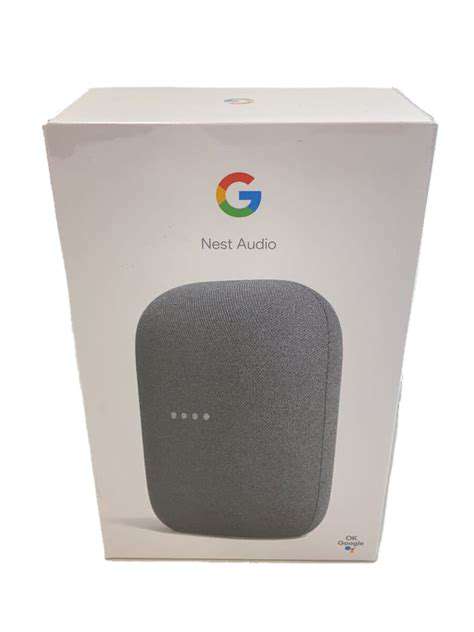
Smart speakers are becoming an essential part of modern households, allowing users to control various smart home devices through voice commands. With the rise in popularity of these devices, choosing the right one becomes paramount for enhancing convenience and functionality. There are two major players in this space: Amazon Echo and Google Nest Audio, each with unique features that cater to different user preferences.
Amazon Echo offers a robust ecosystem thanks to its integration with Alexa, which supports thousands of skills. In contrast, Google Nest Audio leverages Google Assistant's superior search capabilities, delivering information and assistance that many users find invaluable.
2. Sound Quality and Performance
When it comes to audio performance, both speakers bring something different to the table. Amazon Echo is praised for its deep bass and clear vocal sounds, making it ideal for music lovers. However, Google Nest Audio excels in delivering a balanced sound profile that suits a wider range of audio content, from podcasts to music.
According to TechRadar, the Google Nest Audio has received higher ratings in terms of sound clarity, especially at higher volumes. Users have noted that Nest Audio's design allows for better sound dispersion, making it a more effective choice for larger rooms.
3. Smart Home Integration and Ecosystem
- Amazon Echo integrates seamlessly with many smart home devices, thanks to its compatibility with Z-Wave, Zigbee, and Wi-Fi technologies.
- Google Nest Audio benefits from Google's extensive ecosystem, which includes a vast array of compatible devices, especially those designed for smart home automation.
- Both devices offer unique advantages if you're already invested in their ecosystems.
In terms of Smart Home Integration, Amazon Echo has a broader compatibility due to its long-standing presence in the market. This speaker works well with Philips Hue lights, smart locks, and even some security systems. This makes it a versatile choice for users building or expanding their smart home setup.
On the flip side, Google Nest Audio's strength lies in its ability to connect with products within Google’s ecosystem, like Nest thermostats and cameras. This tighter integration often results in a more intuitive smart home experience, especially for users heavily invested in Google services.
4. User Experience and Interface
User Experience is a critical aspect to consider when choosing a smart speaker. Amazon Echo features a simple voice interface that many users find friendly and intuitive. Most users can easily set up and control their smart home devices or request information without a steep learning curve.
Google Nest Audio, however, offers a more visual interface via Google Home app, which is essential for users who prefer visual elements alongside voice commands. While it may take some time for users to adapt to its ecosystem, those who do often report being able to manage their smart homes more effectively.
Ultimately, personal preference plays a significant role in which smart speaker is the best fit. If you value voice interaction, Amazon Echo might be your top choice; however, for those who prefer a deep connection with Google services, Google Nest Audio stands out as an excellent option.
2. Smart Lighting: Philips Hue vs. LIFX
Comparison of Features
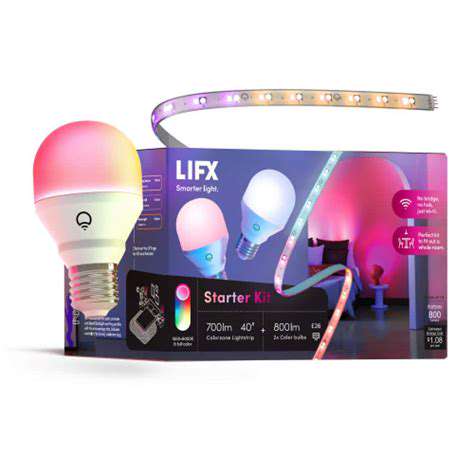
When comparing Philips Hue and LIFX, the first aspect to consider is their feature set. Both brands offer a range of smart lighting options, but their capabilities differ. For instance, Philips Hue supports a more extensive ecosystem, integrating seamlessly with various smart home platforms such as Amazon Alexa, Google Assistant, and Apple HomeKit. In contrast, LIFX boasts a vibrant color range and high brightness levels, setting it apart in terms of visual performance.
Moreover, LIFX bulbs do not require a hub, which can simplify installations for users. This feature allows for a more straightforward setup process and enhances flexibility in terms of placement within the home. In comparison, Philips Hue typically necessitates a bridge to connect multiple bulbs, which can complicate initial installation but allows for more advanced programming and features in larger setups.
Energy Efficiency and Longevity
Energy Efficiency is a key aspect when evaluating smart lighting options. Both brands utilize LED technology, making them much more energy-efficient than traditional incandescent bulbs. Philips Hue bulbs are known for their commendable longevity, lasting around 25,000 hours on average, which means less frequent replacements. This can lead to long-term savings and environmental benefits.
LIFX bulbs, while also boasting a long lifespan of approximately 22,000 hours, may consume slightly more power at maximum brightness compared to Philips Hue. However, they offer excellent color performance which can enhance the aesthetics of your space, justifying their energy consumption for those who value vibrant colors.
- Philips Hue bulbs last about 25,000 hours.
- LIFX bulbs last around 22,000 hours.
- Philips Hue may require a hub for network connectivity.
Price and Value for Money
When considering price, Philips Hue products tend to be priced higher than LIFX bulbs. This price difference can be attributed to the additional functionality provided by Philips Hue, such as compatibility with a wider array of smart ecosystems and advanced features. Investing in Philips Hue can be worthwhile if you are planning a comprehensive smart home integration.
Conversely, LIFX bulbs often provide better value for money in terms of initial costs, especially for singular or smaller setups. They deliver excellent color quality and brightness, making them suitable for those who prioritize aesthetics and light quality over broader smart home compatibility. Ultimately, the choice between these two brands may hinge on your specific requirements and how you plan to utilize your smart lighting.
3. Smart Thermostats: Nest Learning Thermostat vs. Ecobee SmartThermostat
Key Features Comparison
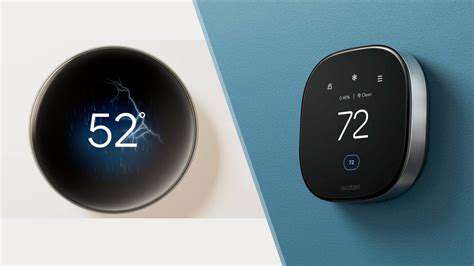
Both the Nest Learning Thermostat and the Ecobee SmartThermostat come packed with impressive features designed to enhance your home's energy efficiency. These devices help you save on heating and cooling costs by adapting to your routines. For instance, the Nest uses machine learning to understand your preferences and adjust temperatures accordingly. In contrast, Ecobee includes multiple room sensors, which allow it to manage temperature in different areas of your home, ensuring optimal comfort throughout.
When comparing their smart capabilities, the Nest’s integration with Google Assistant is seamless, making it easy to control your thermostat with voice commands. On the other hand, Ecobee offers compatibility with both Amazon Alexa and Apple HomeKit, giving users multiple options depending on their smart home ecosystems. This flexibility makes a significant difference in user experience.
- Nest Learning Thermostat features machine learning to adapt to user preferences.
- Ecobee includes room sensors for comprehensive temperature management.
- Nest is compatible with Google Assistant; Ecobee works with Alexa and HomeKit.
Energy Efficiency and Savings
In the realm of energy savings, both smart thermostats shine, but their approaches differ. According to research by the U.S. Department of Energy, utilizing a smart thermostat can reduce heating and cooling expenses by about 10-15% annually. The Nest Learning Thermostat capitalizes on user patterns, optimizing heating schedules based on actual use over time, while Ecobee encourages more proactive energy management with its sensors. This dual-input system considers occupancy and temperature readings in various rooms.
Moreover, the Energy Star certification for both thermostats reflects their commitment to energy-efficient practices. The Nest and Ecobee offer insights into consumption via their respective apps, allowing users to understand where they can cut back even further, promoting not just savings but also environmental responsibility.
Users have reported significantly reduced bills, with some claiming up to $200 in savings per year. However, these figures largely depend on user behavior and local energy costs. It's essential to consider your personal habits when choosing between the two.
Installation and User Experience
The ease of installation often plays a critical role in customer satisfaction. The Nest Learning Thermostat boasts a user-friendly installation process, typically completed in less than thirty minutes. Most users find the step-by-step guidance available on the Nest app straightforward and intuitive, making it accessible even for those not technically inclined.
Conversely, the Ecobee SmartThermostat may require a slightly more intricate setup, particularly when adding additional sensors to enhance its effectiveness. Nevertheless, many users appreciate the increased control it offers and the additional features, such as built-in Alexa functionality for hands-free control.
User experiences tend to differ, with some Nest users praising its sleek design and simplicity, while Ecobee enthusiasts often highlight the advantages of room sensors and Alexa integration. Ultimately, it is essential to choose based on what aligns better with your lifestyle and home environment. Consider your specific needs, be it design, functions, or ease of use.
4. Smart Security Cameras: Ring vs. Arlo
Overview of Ring and Arlo Security Cameras
When evaluating Smart security cameras, Ring and Arlo are two of the most recognized brands in the market. Ring, known primarily for its doorbell cameras, has expanded its lineup to include a variety of indoor and outdoor cameras. Arlo, on the other hand, has positioned itself as a leader in high-end security solutions, offering a range of versatile cameras designed for various environments.
Both brands emphasize ease of use, though their approaches vary. Ring integrates seamlessly with Amazon’s ecosystem, making it a popular choice for existing Amazon device users. Conversely, Arlo cameras often provide greater flexibility in terms of cloud storage options and camera features, catering to users with specific needs in surveillance and recording capabilities.
Key Features and Specifications
In terms of features, both Arlo and Ring offer High-definition video quality, but their specifications target different user needs. Ring typically provides camera models with 1080p resolution, while Arlo’s premium options can reach 4K resolution, appealing to those seeking ultra-clear visuals. Additionally, Arlo’s cameras often include advanced features such as integrated color night vision, which can enhance nighttime surveillance capabilities.
Another crucial aspect is the field of view. Ring cameras usually offer around 130 degrees, while Arlo models can provide a wider coverage of 180 degrees on certain models. This means that users wanting more extensive monitoring may prefer Arlo in scenarios where a broader view is essential.
Battery life also plays a pivotal role in user experience. Ring cameras are generally plugged in, whereas Arlo offers both battery and wired options, giving users more flexibility regarding installation and operation preferences.
Subscription Services and Costs
Both Ring and Arlo offer subscription plans that enhance the functionality of their cameras. Ring Protect starts at $3 per month, allowing users to save video recordings and benefit from additional features. In contrast, Arlo’s plans can cost up to $15 a month for their highest-tier options, which unlock more advanced functionalities and cloud storage capabilities.
While initial hardware costs between the two brands may seem comparable, users should consider the long-term expenses associated with subscription plans. Those who need extensive cloud storage and advanced features may find Arlo’s pricing to be justified based on their usage patterns.
Installation and Ease of Use
Installation processes for both brands are designed to be user-friendly. Ring cameras often emphasize a straightforward setup with an intuitive mobile app guiding users through the installation steps. Whether hardwired or battery-operated, Ring aims to eliminate barriers to entry for new users.
Arlo cameras also boast a user-friendly installation process but may require slightly more time for configuration due to their array of features. Users might need to familiarize themselves with the app’s interface to get the most out of their devices. However, the learning curve pays off, as greater customization is possible once the user acclimatizes.
Integration with Other Smart Home Devices
In the realm of smart homes, integration is crucial. Ring's cameras are particularly effective within the Amazon ecosystem, working seamlessly with Alexa devices. Users can control their cameras through voice commands, enhancing the overall security experience.
Arlo, on the other hand, enjoys compatibility with a broader range of platforms, including Google Assistant and Apple HomeKit. This flexibility allows users to integrate their Arlo cameras into various smart home setups, making it a versatile choice for those using different technologies in their homes.
User Reviews and Satisfaction
User reviews often highlight the effectiveness of both Ring and Arlo cameras in deterring package theft and providing easy access to live feeds. Many Ring users appreciate the instant alerts and user-friendly app interface, which facilitates hassle-free surveillance.
However, some users have reported concerns about Ring's data privacy practices, indicating that transparency is a growing issue for potential consumers. On the flip side, Arlo users frequently commend its video quality and advanced functionalities, though some reviews mention that they faced challenges with initial setup and app navigation.
Final Considerations: Which is Right for You?
Choosing between Ring and Arlo ultimately depends on individual preferences, usage scenarios, and budget considerations. If you are looking for a straightforward, affordable option that integrates easily with Amazon products, Ring may be the best choice for you.
Meanwhile, if you prioritize advanced features, superior video quality, and integration with a variety of smart home systems, Arlo may better suit your needs. Furthermore, always assess your personal requirements, such as storage options and camera flexibility, before making a final decision on which brand aligns with your security goals.
5. Smart Plugs: Wemo Mini vs. TP-Link Kasa
Wemo Mini: Key Features and Benefits
The Wemo Mini smart plug is known for its compact design, which allows it to fit into any socket without blocking adjacent outlets. One standout feature is its compatibility with multiple smart home ecosystems, including Apple HomeKit, Amazon Alexa, and Google Assistant. This broad compatibility ensures that users can integrate the Wemo Mini into their existing setups seamlessly.
Additionally, Wemo Mini offers scheduling capabilities that enable users to set timers or schedules for their devices. For instance, you can program your lights to turn on at sunset or your coffee maker to start brewing before you wake up. Such features enhance convenience and energy efficiency, making it a popular choice among consumers.
TP-Link Kasa: Advantages and Unique Features
The TP-Link Kasa smart plug similarly boasts a range of smart functionalities, including remote access and voice control with Alexa and Google Assistant. However, what sets Kasa apart is its energy monitoring feature. This allows users to track the energy consumption of connected devices, providing insights that can help reduce electricity bills and promote more sustainable usage.
Moreover, the Kasa app is user-friendly, offering a robust interface for managing multiple devices. Users often praise its straightforward setup process, which can be completed in just a few minutes. This accessibility makes it a favored option for both tech-savvy individuals and those new to smart home technology.
Performance Comparison: Connectivity and Responsiveness
When it comes to connectivity and responsiveness, both the Wemo Mini and TP-Link Kasa perform admirably. The Wemo Mini typically connects via Wi-Fi, which provides quick response times. However, some users have reported occasional connectivity issues, particularly in homes with weaker Wi-Fi signals. In contrast, the Kasa plug also relies on a stable Wi-Fi connection but tends to maintain a more consistent performance in diverse network environments.
Real-world tests indicate that Kasa has a slight edge in responsiveness, reacting almost instantly to voice commands and app controls. This performance is crucial for users who depend on real-time interactions for their smart home routines. Therefore, for those looking for reliability in performance, the TP-Link Kasa may be the smarter choice.
User Experiences and Feedback
User reviews are essential in understanding how these devices perform in daily life. Many Wemo Mini users appreciate its compactness and ease of use, particularly for controlling lamps or small appliances. However, some have voiced concerns about the app's interface, which can feel clunky at times, especially for advanced features. Feedback often highlights that while Wemo is great for basic functions, it may require more updates to enhance usability.
On the other hand, TP-Link Kasa receives praise for its reliability and feature-rich app. Users often commend the energy monitoring capabilities as a significant advantage. Feedback also points to the intuitive setup process, making it ideal for users who want minimal hassle when integrating smart devices into their homes.
Some reviews do note that while the Kasa plug is robust, the app has had occasional connectivity lags, especially when managing numerous devices simultaneously. However, the overall consensus is that both products meet user expectations in their respective offerings.
Pricing and Value Proposition
Price is an important consideration when choosing between the Wemo Mini and TP-Link Kasa smart plugs. The Wemo Mini typically retails at a slightly higher price point, reflecting its brand reputation and design aesthetics. Many users may feel that the price premium is justified, especially for those loyal to Apple’s ecosystem who benefit from seamless integration with HomeKit.
Conversely, the TP-Link Kasa smart plug generally offers competitive pricing without sacrificing performance or features. This affordability, combined with the energy monitoring capability, makes it an attractive option for budget-conscious consumers looking for functionality without a hefty investment. In evaluating value, potential buyers should weigh their specific needs against each plug’s unique features.
Read more about Best Smart Home Devices Compared
![How to Use a Cybersecurity Kill Chain Model [Understanding Attacks]](/static/images/25/2025-05/Exploitation3ATakingAdvantageofVulnerabilities.jpg)





Hot Recommendations
- How Software Defines Modern Hardware
- Best Laptops for Battery Performance
- Smart Home Buying Guide
- The Role of AI in Consumer Electronics
- Smart Speakers Reviewed
- Future of Wireless Networking
- Best Gaming Accessories for Competitive Play
- Laptops for Programming Compared
- Headphones vs Earbuds: Which Should You Buy
- Gaming Mice Compared: Sensors and Ergonomics