Tablet Buying Guide: Key Features to Consider
1. iOS: Advantages and Ecosystem Integration
iOS, Apple's operating system for tablets, is well-known for its seamless integration with other Apple devices. This ecosystem approach allows users to easily access and share information across devices like iPhones, Macs, and Apple Watches. The continuity feature enables a user to start a task on one device and finish it on another, which significantly enhances productivity.
Security is another strong point for iOS. Apple invests heavily in protecting users' data and privacy. Regular updates are rolled out for both hardware and software, ensuring that devices are equipped with the latest security features. Additionally, the App Store has rigorous approval processes, which restricts malicious applications, providing a safer environment for users.
2. Android: Customization and Variety
Unlike iOS, Android offers significant Customization Options, allowing users to modify their devices according to their preferences. From changing the user interface to using third-party apps, Android is flexible for users who seek to tailor their experience. This flexibility is particularly beneficial for tech-savvy users who want to optimize their devices for specific tasks or productivity enhancements.
Moreover, the variety of devices available on the Android platform allows users to choose from a vast range of hardware options at various price points. This diversity means that whether you're looking for a premium tablet or a budget-friendly option, there's likely an Android device that fits your needs perfectly.
3. Windows: A Familiar Desktop Experience
Windows tablets aim to bring the desktop experience to a portable format. With applications that mirror those found on traditional PCs, users can enjoy full functionality without compromise. This is particularly advantageous for business professionals or students who require software like Microsoft Office for productivity tasks.
Additionally, Windows provides comprehensive compatibility with most peripherals, including printers, external displays, and USB devices. This connectivity can be a crucial factor for users looking to replicate their home or office setups while on the go. One of the most notable features is the ability to use traditional Windows applications—a distinct advantage over other operating systems.
4. Performance Benchmarks Across Operating Systems
When comparing performance benchmarks, iOS is often lauded for its smooth user experience, thanks to the efficient management of resources. However, Android has made significant strides in performance optimization, particularly with newer devices. For instance, flags on performance reliability are supported by independent testing and comparisons that indicate the processing speeds of high-end Android tablets now rival those of iOS.
Windows devices generally perform well in multitasking scenarios due to their robust hardware requirements. Tests indicate that while iOS may outperform Android in specific tasks, Android shines in terms of flexibility in performance optimization, allowing users to adjust settings for different scenarios.
5. App Ecosystem: Quality vs. Quantity
The App Store for iOS is frequently recognized for its curated quality, featuring applications that are thoroughly vetted. This vetting process not only ensures user safety but often results in higher-quality apps. Conversely, while the Google Play Store has a broader range of applications, the quality can vary widely due to a less stringent approval process, which some users may find frustrating.
For users focusing on specialized productivity apps, Windows has a limited but powerful collection of professional software that can offer functionalities not found on mobile platforms. Thus, the choice of operating system may ultimately depend on the specific app requirements of the user. Research from various tech analysts suggests that user preferences in app ecosystems significantly affect their overall experience and satisfaction with their tablets.
2. Display Quality: Size and Resolution
Understanding Screen Sizes and Their Impact on Usability
The size of a tablet's screen significantly influences user experience, particularly for specific tasks such as reading, gaming, or multimedia consumption. Tablets typically range from 7 inches to 12.9 inches diagonally, and the choice largely depends on personal preference and intended use. For instance, a 7 to 8-inch tablet is more portable and easier to handle for one-handed use, making it suitable for casual browsing or reading on-the-go. In contrast, larger tablets provide an expansive view, which is better suited for editing documents, drawing, or watching videos.
When choosing a tablet size, consider how you plan to use it. If it’s primarily for professional purposes, a larger display with higher resolution can enhance productivity as it allows for multitasking with split-screen features. However, if you often travel or commute, a smaller model may offer a more convenient solution. Interestingly, a survey conducted by Consumer Reports found that users often enjoy larger screens for web browsing but prefer smaller sizes for e-reading, highlighting the importance of aligning tablet size with specific tasks.
Resolution: The Key to Visual Clarity
Resolution is another critical feature when evaluating tablet display quality. The standard measurement of resolution is in pixels, with popular configurations like Full HD (1920 x 1080) and 4K (3840 x 2160) offering varying levels of detail. A tablet with higher pixel density, measured in pixels per inch (PPI), delivers sharper images and clearer text, which is particularly advantageous for graphic design or detailed video work. For example, a tablet with a PPI greater than 300 is generally deemed excellent for visual tasks, as the human eye can barely discern individual pixels at that density.
Educate yourself on the difference between LCD and OLED panels, which also affect image quality. OLED displays tend to have higher contrast ratios, producing deeper blacks and more vibrant colors. This feature is essential for multimedia enthusiasts who enjoy watching movies or playing games on their devices. When purchasing, check reviews that dissect screen performance in real-world scenarios, such as color accuracy in varying lighting conditions. Understanding these nuances will facilitate an informed decision based on how you engage with your tablet, resulting in long-term satisfaction.
3. Performance: Processor and RAM
Understanding Processor Types
When it comes to tablets, the choice of processor significantly influences the overall performance. There are primarily three types of processors used in tablets: ARM, x86, and custom chipsets. ARM processors are the most common, especially in devices running on Android or iOS, due to their energy efficiency and performance balance.
x86 processors, often found in Windows tablets, boast superior performance but may compromise battery life. Custom chipsets, such as Apple's A-series or Samsung's Exynos, often provide the best optimization for software, allowing seamless multitasking and application performance.
RAM Specifications and Their Impact
The amount of RAM is just as crucial as the processor. Generally, tablets with 4GB of RAM are suitable for casual usage like web browsing and streaming. However, if you plan on using professional applications or multitasking more intensively, 8GB or more of RAM is advisable.
Beyond just quantity, the quality and speed of the RAM can also affect performance. Faster RAM can lead to a more responsive user experience. Selecting a device with DDR4 RAM, for instance, can enhance performance compared to older versions.
Performance Benchmarks to Consider
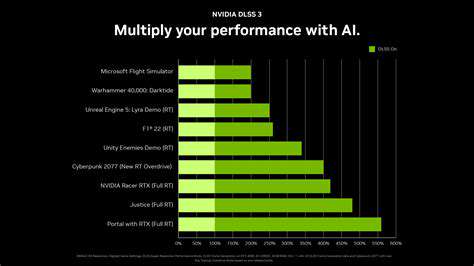
While processor specifications provide a theoretical view of performance, real-world benchmarks are more telling. Popular tools such as Geekbench and AnTuTu release scores that can be used for comparison. Items to note include single-core scores for efficiency and multi-core scores for performance under load. Tablets with high performance in these benchmarks are typically capable of handling demanding tasks with ease.
- Look for Geekbench scores above 700 for decent performance.
- Prioritize tablets that achieve high multi-core scores for heavy multitasking.
- Check for user reviews that corroborate benchmark results for real-world performance.
Real-World Usage Scenarios
The performance requirements vary widely based on how you intend to use the tablet. For gamers, a powerful processor and ample RAM are critical, particularly for high-frame-rate gaming. In contrast, if your primary use is reading or casual browsing, a mid-range device can suffice, provided it meets decent benchmark scores.
Professionals should evaluate if they'll utilize graphic-intensive applications that require not just a good processor but also sufficient RAM and possibly dedicated graphics capabilities. Assessing your primary tasks will help in choosing a tablet that suits both your needs and budget.
Future-Proofing Your Tablet Investment
As software advances, the demands on hardware increase. Investing in a tablet with a more potent processor and increased RAM can prolong the device's life without significant performance lags. A recent study highlighted that tablets with more robust specifications not only perform better now but also remain relevant longer, thanks to ongoing software updates and app development.
Consider your usage patterns and how they might evolve. Choosing a tablet with slightly more RAM or a newer processor can save you from an early upgrade requirement, which is especially valuable if budget constraints are in play. It's worth spending a little more initially for a greater long-term return.
4. Battery Life: Longevity for On-the-Go Use
Understanding Battery Technologies
The type of battery used in a tablet greatly affects its overall longevity. Most modern tablets utilize lithium-ion batteries, which are known for their longevity and efficiency. These batteries typically offer a balance between performance and charging speed, allowing users to engage in heavy tasks without frequent charging interruptions. Typically, a well-maintained lithium-ion battery can retain up to 80% of its capacity even after several hundred recharge cycles.
Emerging technologies, such as solid-state batteries, promise even greater efficiency, with potential future applications in tablets. Solid-state batteries are safer and may provide higher energy densities, which means longer usage periods without increasing the size of the device. Understanding these advancements can help consumers make more informed decisions when purchasing a tablet.
Battery Capacity: What to Look For
When evaluating a tablet's battery life, its capacity, measured in milliampere-hours (mAh), is a fundamental factor. Generally, a higher mAh rating indicates a longer-lasting battery. For instance, tablets with a capacity of 6000 mAh or more typically deliver all-day performance for standard activities like browsing and streaming video. However, users should also consider their specific usage habits; high-resolution gaming or augmented reality applications may drain the battery more quickly than simple web browsing.
Additionally, always check for reviews or battery testing benchmarks for different tablets. Websites like Tom's Hardware and AnandTech often provide insights into real-world battery performance, which can help you ascertain how a tablet's stated battery life aligns with its actual usage in varying circumstances.
Operating System and Power Management
The operating system plays a crucial role in the overall efficiency of a tablet’s battery. For example, iOS and Android both offer advanced power management features that help optimize battery performance based on user habits. Features like adaptive brightness, background app management, and battery saver modes can significantly extend usage time without compromising the user experience.
For users who frequently run power-intensive apps, enabling battery saver modes can keep the tablet functioning longer during essential tasks. Additionally, regular software updates may enhance power efficiency, making it beneficial to stay current with the latest versions of the operating system.
Charging Speed and Portability Considerations
Quick charging capabilities are often an underrated feature when it comes to battery life. A tablet that supports fast charging can significantly reduce downtime, allowing users to get back to using their device more quickly when their battery runs low. For optimal convenience, look for tablets that come with a fast charger included, which can facilitate charging times of around 30 minutes for a substantial charge.
Portability is also a key consideration in selecting a tablet. Users planning to use their device on the go may prefer lighter options that still provide adequate battery life. Devices that offer a slim profile and minimal weight without sacrificing performance create a balance between mobility and usability, perfect for travel or commuting.
Energy-Saving Habits for Users
Battery longevity isn’t solely dependent on the hardware specifications. Users can adopt simple energy-saving habits to extend battery life. For instance, dimming the screen brightness, limiting location services, and reducing the number of apps running in the background can make a notable difference in how much power a tablet consumes.
Moreover, closing unused apps instead of leaving them open can help conserve battery life over a day of use. Encouraging children or less tech-savvy users to adopt these habits can also be beneficial for maximizing their device's utility without the anxiety of prompt charging.
Assessing Real-World Usage and Battery Needs
Ultimately, the best way to determine the ideal battery life for your tablet needs is to assess how you plan to use it. For instance, if your primary activities include video streaming, gaming, or extensive multitasking, you will need a tablet with robust battery capacity and longer life. On the other hand, users primarily engaging in simple browsing or note-taking may not need the higher mAh ratings.
Before finalizing your purchase decision, consider conducting some hands-on testing with tablets in stores. Engaging with multiple devices can provide you with a tangible sense of their battery performance and ergonomics, ensuring you make a choice tailored to your specific lifestyle needs.
5. Connectivity and Accessories: Wi-Fi, LTE Options, and More
Understanding Wi-Fi Standards: What You Need to Know
When selecting a tablet, understanding Wi-Fi Standards is crucial. Most tablets support various Wi-Fi versions, from the older 802.11n to the latest 802.11ax, known as Wi-Fi 6. The latter offers improved performance and efficiency, handling multiple devices more effectively.
Wi-Fi 6 provides faster speeds, lower latency, and better coverage. If you're utilizing your tablet for tasks like video conferencing, streaming, or online gaming, opting for a tablet that supports Wi-Fi 6 can be beneficial, especially in busy households where multiple devices are connected.
Exploring LTE Options: Is Cellular Connectivity Worth It?
Cellular Connectivity in tablets allows you to stay connected without relying on Wi-Fi networks. LTE-enabled tablets offer the convenience of internet access anywhere within cellular coverage, which can be incredibly beneficial for travelers or those who work remotely.
Before investing in an LTE tablet, consider your typical usage scenarios. If you often find yourself in areas with unreliable Wi-Fi, the additional cost of a data plan may be justified. However, for casual browsing or use primarily at home, Wi-Fi only might suffice.
Furthermore, many LTE tablets include features like eSIM technology, allowing users to switch carriers without needing a physical SIM card, promoting flexibility and convenience in connectivity.
Accessory Essentials: Enhancing Your Tablet Experience
When it comes to maximizing your tablet's functionality, accessories play a significant role. A quality keyboard can transform your tablet into a productivity powerhouse, making typing easier and more efficient—especially important for work-related tasks.
Additionally, consider investing in a protective case. Tablets are often quite portable, making them susceptible to drops and scratches. A robust case not only protects your device but can also enhance grip, making usage more comfortable.
Don’t overlook the value of styluses or digital pens for drawing or note-taking. Devices like the Apple Pencil for iPads can enhance creativity and precision when working on designs or annotations.
Lastly, screen protectors are vital for maintaining display integrity, especially for those using their tablet extensively and for artistic endeavors.
Power Banks and Portable Chargers: Staying Charged on the Go
Battery life is a crucial consideration when choosing a tablet. However, even the best batteries can drain quickly, especially with heavy usage. This is where power banks and portable chargers come in handy.
When selecting a power bank, look for one with a capacity greater than 10,000mAh, which can provide multiple charges for most tablets. Verify compatibility to ensure efficient charging without damaging the device battery. Brands like Anker often garner positive reviews for their reliability.
Furthermore, portable chargers with pass-through charging capabilities allow users to charge both the power bank and the tablet simultaneously, thus providing an efficient solution for extended trips or busy workdays.
Choosing the Right Display Size for Connectivity and Use
The display size of a tablet can significantly influence its connectivity experience. Larger tablets often support more advanced connectivity options, as seen in the latest flagship models. For instance, a 12.9-inch iPad Pro not only provides a better viewing experience but also integrates support for advanced USB-C accessories.
Consider what you'll primarily use the tablet for; if you'll be doing a lot of multitasking or using multiple apps side-by-side, a larger screen can enhance productivity. On the other hand, if portability is a priority, smaller devices may better suit your lifestyle.
Data Plans for LTE Tablets: What to Consider
When opting for an LTE tablet, choosing the right data plan is essential. Evaluate your internet usage to select a plan that meets your needs—whether you prefer pay-as-you-go options or unlimited data packages.
Some carriers offer family plans, which can make mobile internet access more economical. Additionally, look out for promotions or bundling options that come with other services you may be using, such as discounts on home internet services.
Also, it's crucial to understand the coverage in your area. Check the carrier’s coverage maps to ensure that you'll have a strong signal where you typically use your tablet. This can save you from connectivity frustrations in the long run.
Future-Proofing Your Tablet: Investing Wisely in Connectivity Technologies
As technology continues to evolve, investing in a tablet with the latest connectivity features can extend its usability significantly. Look for models that support emerging technologies such as Wi-Fi 6 and the upcoming Wi-Fi 7, allowing you to stay ahead of the curve.
5G technology is another consideration. While still making its way into many markets, tablets with 5G capability can ensure faster internet speeds and enhanced streaming options in the future, making them a potentially smart long-term investment.
Ultimately, the right balance between current needs and future capabilities will help guide your purchase, ensuring that your tablet remains functional and efficient for years to come.
Read more about Tablet Buying Guide: Key Features to Consider










Hot Recommendations
- Cloud Platforms Compared for Developers
- Best Budget Gaming Setups
- How to Compare Tech Products Effectively
- Best Tech Gifts for 2025
- Monitor Buying Guide for Beginners
- Future of Work Technology Explained
- Understanding Tech Specs Before You Buy
- Privacy Regulations Explained for Consumers
- Best Monitors for Creative Professionals
- How Hardware Affects Development Productivity