Laptop Selection
Developer Requirements
Processor
RAM
Laptop
Programming
Speed
Productivity
Development Usability

How to Choose a Laptop for Programming and Development

Intel and AMD. Intel’s Core i5 and i7 processors are widely recognized for their efficiency in handling simultaneous tasks, making them suitable for software development. Meanwhile, AMD’s Ryzen series offers competitive performance at often lower prices, appealing to budget-conscious developers.

When evaluating processors, you should also consider the number of cores and threads. A processor with a higher core count can handle more simultaneous operations, which is invaluable when compiling code or running virtual machines. For instance, a quad-core processor may suffice for basic coding tasks, but for more intensive development environments, opting for a six or eight-core processor is advisable.

Performance Metrics to Consider

Performance isn't just about the processor model; it’s about the overall system capability. Benchmarks and performance metrics like PassMark scores give insight into a processor’s capabilities under various workloads. Comparing these metrics can guide a programmer to the best choice, especially when considering how different processors handle tasks like code compilation and data manipulation.

An often overlooked factor is thermal design power (TDP). Processors with lower TDP typically dissipate less heat and require less energy, which can enhance battery life—important for developers who work on the go. As a rule of thumb, look for processors with a TDP of 35 watts or lower for better thermal efficiency.

Another performance indicator is clock speed, measured in GHz. While higher clock speeds translate to faster processing, a balance between clock speed and the number of cores is crucial. For coding tasks, a combination of a solid clock speed with multiple cores often yields the best performance.

The Role of RAM in Programming

While the processor is central to your laptop's performance, RAM plays a critical role in ensuring smooth operation for complex tasks. Most programming environments and IDEs recommend at least 16GB of RAM for optimal performance. More RAM allows for more applications to run simultaneously without slowing down the system, especially when working with large datasets or during extensive debugging sessions.

Investing in RAM with higher speeds, such as DDR4 or DDR5, can provide additional performance boosts, as these types mitigate bottlenecks in data retrieval and processing. Remember, a laptop that allows for future RAM upgrades can be beneficial for those looking to extend its life and performance without having to purchase a new system soon.

Choosing the Right Graphics Processor

Depending on the programming tasks you intend to undertake, the graphics processor (GPU) might also be an essential consideration. For most web and software development tasks, integrated graphics suffice. However, if you're venturing into game development, machine learning, or heavy graphical tasks like 3D rendering, a dedicated GPU is invaluable.

NVIDIA and AMD are the leading players in the dedicated GPU arena, with NVIDIA’s RTX series offering powerful performance suited for demanding tasks. Additionally, look for laptops that have ample VRAM, as this helps in efficiently handling complex graphical tasks and ensures smooth rendering.

It’s also worth noting that some software development platforms are optimized for GPU acceleration, which can significantly enhance productivity. If you plan on delving into such areas, prioritizing a laptop with a strong GPU will serve you well and potentially save you from frustrating slowdowns.

3. RAM and Multitasking Capabilities

Factors Influencing RAM Requirements

When selecting a laptop for programming and development, understanding your specific use case is vital. For instance, working on complex software projects often requires more RAM compared to simple web development tasks. Development environments such as Integrated Development Environments (IDEs) like Visual Studio or IntelliJ can be memory-hungry, particularly when working with large codebases or running multiple applications simultaneously. Experts often recommend at least 16GB of RAM for intensive tasks to ensure smooth performance and minimize slowdowns.

Moreover, consider the type of programming languages you employ. Languages that rely heavily on memory management, such as C++ or Java, typically benefit from a higher RAM allocation. In contrast, more lightweight scripting languages, including JavaScript or Python, can function effectively with less memory. Aligning your RAM options with your development tools ensures your laptop can handle programming tasks without hindrance.

Impact of RAM on Multitasking Efficiency

Multitasking capabilities are greatly influenced by a laptop's RAM size. For developers, running resource-intensive applications concurrently, such as servers, databases, and graphics design tools, can strain lower RAM specifications. When multiple applications are open, insufficient RAM can lead to noticeable lag and interruptions in the workflow. A laptop with ample RAM allows for seamless transitions between applications, thus enhancing productivity.

Future-proofing Your Laptop with RAM Upgrades

Choosing a laptop with upgradeable RAM can significantly extend its lifespan, making it a cost-effective decision in the long run. As programming needs evolve, so too will the requirements for memory. Many modern laptops allow for additional RAM to be added, which may be a worthwhile investment for future-proofing your setup. This flexibility means you won’t have to replace your laptop entirely when your development tasks demand more memory.

RAM Speed Versus Capacity in Development

While RAM capacity is crucial, speed should not be overlooked. The speed at which RAM can process data is essential for ensuring that applications run efficiently. Look for laptops with DDR4 or DDR5 RAM, which provide higher bandwidth and improved performance. Balancing both speed and capacity is key; for instance, a laptop with 32GB of slower RAM may perform poorly compared to a machine with 16GB of faster RAM, failing to meet your programming demands effectively.

4. Storage Options: SSD vs. HDD
4.StorageOptions:SSDvs.HDD

Understanding SSDs: Speed and Performance

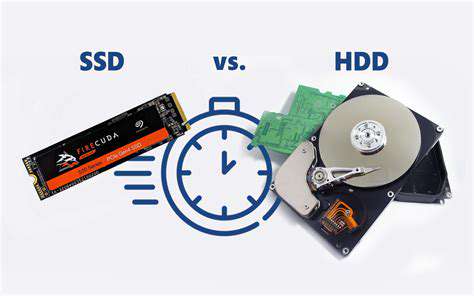
Solid State Drives (SSDs) offer unparalleled speed when it comes to data access. Programs launch almost instantaneously, which is particularly beneficial for development environments that require quick compilation times. This speed can significantly boost productivity.

Furthermore, SSDs use flash memory, making them more reliable and durable than their HDD counterparts. This reliability is crucial for programmers who often work with sensitive data; consequently, fewer hardware failures mean less potential for data loss.

Exploring HDDs: Capacity and Cost

Hard Disk Drives (HDDs), although slower, provide a cost-effective solution for those needing large amounts of storage. An HDD can offer several terabytes of space at a fraction of the cost of SSDs. If budget constraints are significant, HDDs become a compelling choice.

However, it's essential to weigh the trade-off between speed and storage capacity. For example, heavy projects involving large data sets or multiple virtual machines could benefit from the additional space that an HDD provides.

Hybrid Drives: The Best of Both Worlds?

Hybrid drives, or SSHDs, attempt to merge the benefits of SSDs and HDDs by incorporating both types of storage. They use small amounts of SSD storage to cache frequently accessed data while maintaining high capacity through traditional magnetic disks. This can be a great compromise for developers who wish to maximize both speed and storage.

  • Temporarily boosts data access speeds for commonly used applications.
  • Retains larger storage for bulky files and less frequently accessed data.

Choosing the Right Option for Programming Tasks

The choice between SSDs and HDDs can greatly impact a programmer's workflow. For instance, if you're primarily working on large databases or applications that require constant data read/write operations, an SSD will likely enhance your experience. Moreover, developers who work in web development or run virtual machines may find SSDs more beneficial due to their speed.

Conversely, projects that don't heavily rely on rapid data access, such as processing scripts that run periodically, could be well-served by HDDs without significant loss of performance.

Future Trends in Storage Technology

The storage landscape is evolving rapidly, with emerging technologies such as NVMe (Non-Volatile Memory Express), which offer even faster data access speeds compared to traditional SSDs. Innovations in storage technology suggest that programmers should keep a close eye on these trends to stay ahead of the curve. By choosing a laptop that supports these advancements, developers can future-proof their workstations.

Essentially, staying informed about advancements can lead to better decision-making when it comes to selecting a laptop that enhances programming capabilities.

Final Thoughts on Selecting Storage for Programming

Ultimately, the right choice of storage—whether SSD, HDD, or hybrid—depends on individual needs and budget. Assess your workload and determine whether speed or capacity holds more value to you. In conclusion, balancing your budget with these factors is crucial in enhancing your programming efficiency.

As you consider your options, keep in mind that your choice of storage can impact everything from software loading times to overall system performance, so choose wisely.

5. Battery Life and Portability

5.BatteryLifeandPortability

Understanding Battery Life Requirements

The battery life of a laptop plays a crucial role in determining its usability for programming and development tasks. Developers often work in various environments and switching between locations can be frequent. Therefore, it's important to consider how long the laptop can last on a single charge during intense coding sessions.

Generally, a laptop that provides a minimum of 8 hours of battery life is recommended for developers. While some models may claim longer durations, actual performance can vary based on usage. Research indicates that laptops equipped with energy-efficient processors, such as the latest Intel or AMD chips, tend to maximize battery longevity.

  • Look for laptops with a minimum of 8 hours of battery life.
  • Energy-efficient processors can enhance battery endurance.
  • Real-world usage may differ from manufacturer claims.

Evaluating Portability Features

Portability is another vital aspect to consider when selecting a laptop for programming. As a developer, you may find yourself working in coffee shops, libraries, or even at client sites. A lightweight laptop, preferably below 4 pounds, can significantly enhance your ability to work on the go.

Beyond weight, dimensions and build quality matter as well. A slim profile not only makes it easier to carry around, but it also reduces space taken up in bags or backpacks. Look for models that offer a balance of portability and durability, ensuring that they can withstand frequent travel.

Additionally, battery efficiency supplements portability; having long battery life means you won't be tethered to a power outlet. Consider devices with fast-charging capabilities as they can quickly provide additional power during short breaks, accommodating your busy schedule. Investing in a laptop that supports these features will aid in creating a more seamless workflow, no matter where you find yourself working.

Read more about How to Choose a Laptop for Programming and Development

Best Calendar Apps for Time Management
May 03, 2025
Learn to Code for Free: Top Online Resources
May 12, 2025
Best Apps for Learning to Code on the Go
May 16, 2025
How to Boost Your Productivity with [Specific App Name]
May 21, 2025
How to Use [App] for Digital Journaling and Reflection
Jul 01, 2025
Understanding Privacy Policies You Agree To
Aug 07, 2025
Best Laptops for Battery Life in 2023When looking for a reliable laptop, battery life is often a top priority. This guide reviews the best laptops of 2023, focusing on their design, performance, and impressive battery longevity. Whether you're a professional, student, or casual user, these models offer robust features and exceptional battery performance. 1. Dell XPS 13 (2023 Model)The Dell XPS 13 (2023 Model) showcases a sleek design with a durable aluminum chassis and a carbon-fiber palm rest. Known for its vibrant 4K display, it ensures color accuracy for graphic-intensive tasks. Users can expect up to 14 hours of battery life, backed by powerful Intel processors and efficient thermal management, enabling users to run demanding applications seamlessly. Connections are convenient with multiple Thunderbolt 4 ports, making this laptop an excellent choice for professionals on the go. 2. Apple MacBook Air M2With the Apple MacBook Air M2, you get a significant boost in performance thanks to the M2 chip. It’s equipped with up to 24GB of memory and 2TB of storage. The Retina display offers beautiful visuals perfect for creative tasks. With an outstanding 18 hours of battery life, this laptop ensures you won't need to scramble for a power outlet during your busy day. Users praise the seamless integration of hardware and software that enhances productivity, making it ideal for students and professionals alike. 3. Lenovo ThinkPad X1 Carbon Gen 10The Lenovo ThinkPad X1 Carbon Gen 10 is built for endurance with an average battery life of up to 15 hours. Thanks to its efficient OLED display and power management features, this laptop is suitable for heavy usage, making it perfect for professionals engaging in data analysis and video conferencing. Rapid Charge technology allows users to get approximately 80% charge in just under an hour, making it a standout for busy workdays. 4. HP Spectre x360 14The HP Spectre x360 14 features a sophisticated gem-cut design and weighs just 3 pounds, catering to portability. Its stunning 14-inch OLED touchscreen is designed for multimedia consumption with bold visuals. Users can enjoy up to 13 hours of battery life with fast charging capabilities. Connectivity options include multiple USB Type-C and Thunderbolt 4 ports, ensuring versatility for various devices. 5. ASUS ZenBook 13 OLEDWeighing only 2.5 pounds, the ASUS ZenBook 13 OLED is designed for mobility without sacrificing power. Equipped with up to 16GB of RAM and fast SSD storage, it handles multitasking and provides up to 15 hours of battery life on a single charge. Its array of ports, including USB-C and HDMI, enhance connectivity. The integrated fingerprint sensor and backlit keyboard further bolster security and usability. ConclusionChoosing the right laptop requires considering various factors, but battery life remains paramount. The laptops highlighted in this guide stand out in 2023 for their exceptional performance and longevity. From the Dell XPS 13's sleek design to the power-packed Apple MacBook Air M2, these options cater to diverse needs without compromising on battery efficiency.
Feb 07, 2026
- Display Resolution: Higher resolutions (like 4K) can enhance image clarity, essential for multitasking.- Screen Size and Ergonomics: Aim for at least a 27-inch size for optimal multitasking abilities, along with adjustable stands to improve posture.- Panel Technology: IPS panels offer superior color accuracy, ideal for designers, while TN panels favor fast refresh rates for gamers.- Connectivity Options: Ensure multiple input ports for different devices, with USB-C options for future compatibility.- Refresh Rate and Response Time: Higher refresh rates (120Hz and above) provide smoother visuals, beneficial for both work and play. Top Picks for 2023For creative professionals, monitors like the Dell UltraSharp U2720Q and BenQ PD3220U are top-rated for their color accuracy and connectivity options. Budget-friendly options like the AOC 24G2 and LG 27UK650-W offer excellent performance without breaking the bank. ConclusionA good monitor is not merely a tool; it is an investment in your productivity and well-being. By choosing the right display, you can create a work environment that fosters both efficiency and comfort, helping you achieve your professional goals. Make the right choice today and optimize your workflow for the future.
Feb 07, 2026
Understanding Key ComponentsWhen investing in a laptop, understanding its internal components is essential for optimizing performance. This guide explores the vital roles of processors, memory, storage, graphics cards, battery life, and thermal management in enhancing your computing experience. Processor: The Heart of Performance The processor architecture—be it ARM, x86, or RISC—greatly influences a laptop's performance. With x86 architectures dominating the market, particularly in laptops, knowing the number of cores and clock speed is crucial for multitasking and demanding applications like gaming and video editing. For example, while a dual-core CPU at 3.5 GHz might outperform a quad-core at 2.5 GHz in single-threaded tasks, the balance between clock speed, efficiency, and architecture must be carefully considered. Memory: RAM's Role in SpeedThe capacity, speed, and type of RAM significantly affect a laptop's overall performance. Devices with more RAM can handle multiple applications efficiently. For everyday tasks, 8GB is adequate; however, data-heavy functions may require 16GB or more. Dual-channel RAM configurations can improve performance through enhanced bandwidth, making it essential for those handling intensive applications. Storage: Impact on Load TimesStorage types, namely SSDs and HDDs, have a direct effect on load times and overall responsiveness. SSDs offer superior speed, fostering better performance in application launches and file transfers, while HDDs fall short. For a smooth experience, opting for an SSD is highly recommended, especially for professionals engaged in tasks requiring large files. Graphics Card: A Must for Visual PerformanceThe architecture of a graphics card, identified by its design and processing capabilities, is critical for gaming and professional applications. More CUDA cores or stream processors mean better performance. For gaming, a robust GPU can enhance frame rates and visual quality. Adequate VRAM is also necessary to handle high resolutions and complex scenes, ensuring an optimal user experience. Battery Life and Thermal ManagementModern lithium-ion batteries provide better performance but require effective management to maximize longevity. Usage patterns greatly influence battery life; high-demand tasks will decrease energy levels faster. Implementing thermal management strategies, such as efficient cooling systems, is crucial to prevent performance drops due to overheating.To optimize your laptop experience, understanding these components is essential. Keep abreast of advancements to make informed purchasing decisions that will keep your laptop running efficiently for years to come.
Feb 10, 2026
Top Laptops and Accessories for Your Home Office Essential Features for Home Office LaptopsWhen selecting a laptop for your home office, prioritize performance to ensure smooth multitasking. Look for models equipped with at least an Intel i5 or AMD equivalent processor, along with ample RAM. Portability is another critical factor as you may need to shift your workspace within your home. Aim for laptops that weigh less than 4 pounds for convenient relocation. Additionally, a long-lasting battery life and robust connectivity options are crucial for uninterrupted work sessions. Top Picks for Home Office LaptopsAmong the leading brands, the Apple MacBook Air features the M1 chip, delivering exceptional performance and battery longevity. For those who seek versatility, the HP Spectre x360 offers a convertible design. The Dell XPS 13 impresses with its stunning display, while the budget-friendly Acer Aspire 5 provides solid specifications without breaking the bank. Each of these laptops is designed to cater to different working styles, including touchscreen options for enhanced productivity. Essential Accessories for Your Home OfficeTo maximize productivity, consider essential accessories such as an ergonomic office chair that supports good posture and prevents back pain. A high-quality monitor, preferably 4K resolution, can enhance your multitasking capabilities significantly. Moreover, a reliable keyboard and mouse are essential; options that reduce wrist strain can help prevent long-term issues. Don’t overlook the importance of a high-speed internet connection, as stable connectivity is the backbone of a productive workspace. Task LightingIllumination is key for maintaining focus and reducing eye fatigue. Lighting solutions such as adjustable desk lamps can create an inviting work environment. Brands like TaoTronics provide energy-efficient options designed to reduce glare and improve comfort. Organizational ToolsStaying organized is fundamental to enhancing productivity. Utilize desk organizers and cable management solutions to keep your workspace tidy. Digital planners like Todoist or Trello can assist with task management, helping you prioritize your daily responsibilities. Noise-Canceling HeadphonesIn a bustling home setting, noise-canceling headphones can minimize distractions and boost concentration. Options from Bose and Sony offer comfort and quality, making them ideal for long working hours. Ergonomics and Comfort in Your Home OfficeCreating an ergonomic workspace is essential to improve comfort and prevent long-term health issues. Invest in adjustable furniture to maintain proper posture, like chairs with lumbar support and sit-stand desks. Setting up your monitor at eye level can mitigate neck strain while maintaining a clean and organized environment contributes positively to focus and productivity. Regularly assess your setup to adapt to changing needs; listening to your body can help identify necessary adjustments for continued comfort. Personalizing your office with soothing color schemes and supportive furniture can create a space conducive to both work and relaxation.By choosing the right laptops and accessories, and focusing on ergonomics, you can create a highly functional home office that promotes productivity and well-being.
Feb 12, 2026
Your Ultimate Guide to Selecting the Best Budget LaptopsAre you in the market for a new laptop but constrained by budget limitations? Choosing a budget laptop can be overwhelming, but understanding key specifications and available options can simplify your decision-making process. This comprehensive guide explores the essential factors to consider when selecting an affordable laptop that meets your needs without sacrificing quality. Key Factors to Consider in Budget Laptops Performance SpecificationsWhen browsing through budget laptops, pay close attention to performance specifications. Look for laptops with at least a dual-core processor for basic tasks, while quad-core options offer better performance for demanding applications. A minimum of 8GB RAM will enhance multitasking capabilities, while Solid State Drives (SSDs) are recommended for faster boot times and improved responsiveness compared to traditional Hard Disk Drives (HDDs). Display Quality and Battery LifeDon’t overlook display quality; a full HD (1920 x 1080) resolution is ideal for streaming and image editing. Additionally, seek out laptops that provide at least 6-8 hours of battery life to ensure you can work on the go without frequent recharges. Comparative Overview of Budget Laptop Models Key Features to InvestigateCritical features such as processing power, RAM, storage options, and battery life are paramount. A laptop’s screen resolution and available ports can significantly impact usability, so look for models that include USB-C, HDMI, and traditional headphone jacks for optimal connectivity. Performance ComparisonFor instance, the Acer Aspire 5 and HP Pavilion x360 are notable budget models. The Aspire 5, equipped with an AMD Ryzen 5 processor and 8GB RAM, excels in reliability and multitasking capabilities. Meanwhile, the HP Pavilion x360's 11th-gen Intel processor offers superior energy efficiency and graphics performance, making it ideal for creative tasks. Pricing and Value ConsiderationsBudget laptops typically range from $300 to $700. Weigh each model’s specifications against its price point to ensure you are receiving the best value. Investing a little more may lead to prolonged usability; for example, the Lenovo IdeaPad 3, priced under $400, showcases commendable performance for its cost. Tailored Recommendations Based on User NeedsDifferent user bases may have varying requirements. Students may prefer Chromebooks for their affordability and seamless web integration, while professionals might favor the Dell Inspiron series for its robust performance and durable design. Performance InsightsUnderstanding performance metrics, such as processor speed and RAM size, is crucial in making an informed choice. Laptops with SSDs significantly outperform those with HDDs, reducing application load times and enhancing the overall experience. Benchmarking Against CompetitorsUtilizing benchmarking tools and reviewing results from sites like Laptop Mag can provide valuable insight into how specific models compare in real-world usage. Battery Life and PortabilityBattery performance varies widely; factors like screen resolution and processor type play a vital role. Lighter models under 3 pounds may facilitate easier transport, particularly for students and remote workers. Long-Term ConsiderationsInvesting in a budget laptop also means factoring in long-term battery health and the potential need for upgrades. Ensuring future-proofing elements, like expandable RAM and compatible ports, can preserve your investment for years to come.In conclusion, equipping yourself with the right knowledge about budget laptops will enhance your buying experience. If you're seeking an affordable yet capable laptop, remember to prioritize specifications that align with your usage needs to achieve a balance of performance and value.
Feb 12, 2026
A Comprehensive ComparisonIn today's fast-paced digital world, the right tablet can become your ultimate productivity tool. Whether you're a creative professional, a remote worker, or a student, the latest tablets offer not just portability but also powerful performance to handle demanding tasks. In this article, we dive into four top contenders: Apple iPad Pro, Microsoft Surface Pro 9, Samsung Galaxy Tab S8 Ultra, and Lenovo Tab P12 Pro. Each tablet has unique features that cater to different user needs, making it essential to choose wisely. Apple iPad Pro: The Powerhouse ChoiceApple's iPad Pro stands out with its M1 chip, offering unmatched processing power and performance. Ideal for professionals needing efficient multitasking and high-performance applications such as video editing, its up to 2TB storage and stunning Liquid Retina XDR display provide an impressive user experience. The iPadOS enhances usability with capabilities like Split View for multitasking, making it a versatile tool for creatives. Key Features:- Performance: M1 chip for unmatched speed.- Display: Liquid Retina XDR for stunning visuals.- Accessories: Supports Apple Pencil and Magic Keyboard for enhanced functionality.- Battery Life: Up to 10 hours of continuous usage. Microsoft Surface Pro 9: A Laptop ReplacementThe Surface Pro 9 is designed to replace traditional laptops, equipped with powerful Intel Core i5 or i7 processors and up to 32GB RAM, ensuring seamless multitasking. Its lightweight, sleek design makes it portable, while the 13-inch PixelSense touchscreen provides vibrant visuals. With features like the Surface Slim Pen 2, it’s perfect for professionals who require versatility and a comfortable writing experience. Key Features:- Performance: Intel Core processors for high productivity.- Design: Sleek and lightweight profile for easy transport.- Usability: Kickstand for flexible viewing options. Samsung Galaxy Tab S8 Ultra: A Multitasker's DreamWith a 14.6-inch Super AMOLED display, the Galaxy Tab S8 Ultra is designed for both professionals and casual users. Powered by the Snapdragon 8 Gen 1 processor, it excels in multitasking. The device supports S Pen for note-taking and creative tasks, while its robust 11,200mAh battery ensures it can handle a full day of use without needing a charge. Key Features:- Display: Impressive AMOLED for enhanced visuals.- Performance: Snapdragon processor with up to 16GB RAM.- Battery Life: Up to 14 hours with fast charging options. Lenovo Tab P12 Pro: Affordable VersatilityThe Lenovo Tab P12 Pro features a gorgeous 12.6-inch AMOLED display and is powerful enough to handle demanding multitasking, thanks to its Snapdragon 870 processor. With a remarkable battery life of up to 14 hours and fast charging capability, this tablet stands out in its class. It also supports productivity accessories like the Lenovo ThinkPad keyboard and Precision Pen 3, making it an all-rounder for both work and leisure. Key Features:- Display: High-resolution AMOLED for immersive experiences.- Performance: Snapdragon 870 for superior speed and multitasking.- Affordability: Features high-end specifications at a competitive price. ConclusionWhen considering a tablet for productivity, each option presents compelling reasons to choose it. The iPad Pro is for those needing sheer power, while the Surface Pro 9 offers the portability of a laptop. The Galaxy Tab S8 Ultra excels in display and multitasking, and the Lenovo Tab P12 Pro provides affordability without compromising quality. Choose the one that best fits your needs, and elevate your productivity today!
Feb 12, 2026
View Publication>>

Hot Recommendations