Best Budget Monitors for Home Offices
1. Dell P Series P2219H
Design and Ergonomics
The Dell P2219H features a sleek, Modern Design that easily complements any workspace setup. With its thinner bezels, it provides an expanded viewing area, which is especially beneficial for those multitasking with multiple applications. The monitor’s adjustability is another standout feature, allowing users to easily tilt, swivel, and adjust the height, ensuring comfort during prolonged use. This can significantly reduce neck strain and enhance productivity levels, particularly for individuals who spend long hours in front of the screen.
The build quality of the P2219H is commendable, with a sturdy stand that prevents wobbling, making it reliable during quick movements or adjustments. Furthermore, the monitor is VESA-compatible, giving users the flexibility to mount it on a wall or an ergonomic arm, which is ideal for optimizing desk space. Such design considerations make the P2219H not only functional but also visually appealing in a home office environment.
Display Quality and Performance
Equipped with a Full HD resolution of 1920 x 1080, the Dell P2219H offers sharp, clear images that are suitable for various tasks, from document editing to video conferencing. The IPS technology provides wide viewing angles, up to 178 degrees, which means the Display Quality remains consistent from different perspectives. This is particularly useful for team collaborations where multiple users might need to view the screen simultaneously.
Moreover, the monitor boasts a respectable color accuracy with 99% sRGB coverage, allowing for excellent color representation. This is vital for graphic work, as precise color details can greatly influence project outcomes. Additionally, the 60Hz refresh rate and 5ms response time provide a smooth experience for casual gaming or video playback, though certainly not geared towards hardcore gaming enthusiasts.
Connectivity and Additional Features
The Dell P2219H comes equipped with a variety of ports, including HDMI, DisplayPort, and USB 3.0 options, ensuring compatibility with various devices. This allows users to connect laptops, desktops, and even external peripherals seamlessly. Such versatility is essential in today’s diverse tech environments, where devices often vary from user to user.
Importantly, this monitor features Dell’s ComfortView technology, which reduces harmful blue light emissions, making extended use less straining on the eyes. This is a significant consideration for those who work long hours, especially within home office settings where comfort becomes paramount. The P2219H also integrates energy-saving measures, meeting ENERGY STAR standards, which underscores its efficiency in power consumption, ultimately benefiting both personal budgets and the environment.
2. ASUS ProArt PA248QV
Specifications and Features
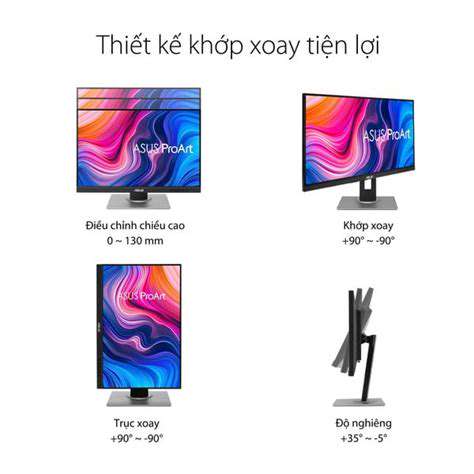
The ASUS ProArt PA248QV is designed with a 24.1-inch WUXGA display, providing a resolution of 1920 x 1200 pixels, which exceeds the standard 1080p. Users will appreciate the extra vertical space, which is particularly useful for multitasking in a home office setting. The display supports 100% sRGB color space, making it ideal for creative professionals who need accurate color representation.
Equipped with an IPS panel, the monitor offers consistent color and performance regardless of viewing angles. This is crucial when multiple people are sharing the screen during presentations or discussions. Additionally, it features a plethora of connectivity options like DisplayPort, HDMI, and USB hubs, allowing ease of access for various devices.
Calibration and Color Accuracy
One of the standout features of the ProArt PA248QV is its Factory-calibrated color accuracy, achieving a Delta E < 2 rating. This means that color reproduction on this monitor is not only precise but also consistent, which is essential for graphic design and photo editing. Using such a monitor ensures that colors appear as they should across different screens and devices.
Moreover, ASUS provides an accompanying ProArt Palette software that further enhances the calibration process. Users can adjust color settings according to their specific preferences, giving an added layer of customization. This professional-grade calibration is not often found in budget monitors, making the ProArt PA248QV a unique contender in its category.
Design and Ergonomics
The ASUS ProArt PA248QV is remarkable for its ergonomic design. It features a fully adjustable stand that allows for height, tilt, swivel, and pivot adjustments, catering to various user needs and preferences. This is particularly important for promoting comfort during long working hours, as correct posture is crucial to avoid strain and discomfort.
In terms of aesthetics, the monitor boasts a sleek bezel design that maximizes the screen area while minimizing distractions. The overall build quality is robust, ensuring durability without compromising on style, making it a fitting addition to any home office setup.
Value for Money
- Competitive pricing for the features offered.
- High color accuracy suitable for professional tasks.
- Versatile connectivity options enhance usability.
When evaluating the ProArt PA248QV, it becomes clear that it offers significant value for the price point. Many competitors may provide similar specifications, but few match the level of calibration and build quality that ASUS has managed to include at this price. This makes it an attractive option for anyone looking to enhance their home office without breaking the bank.
User Reviews and Feedback
User feedback highlights the seamless performance of the ProArt PA248QV, particularly in graphic design tasks. Many reviewers have commented on how the accurate color representation has improved their workflow significantly. Others have praised the adjustable stand, noting how it allows for a personalized setup tailored to their individual needs.
Some users have pointed out minor concerns regarding the built-in speakers, suggesting that they may not be suitable for high-quality audio tasks. However, this is often a common trade-off in monitors of this type, especially considering the primary focus is on display quality rather than audio performance.
Conclusion
In summary, the ASUS ProArt PA248QV presents an impressive balance of quality, performance, and price, positioning itself as one of the best budget monitors for home offices. With Exceptional color accuracy and ergonomic features, it caters to both professionals and casual users alike. For anyone who values screen quality and comfort, this monitor is indeed a worthy investment to consider.
3. Acer R240HY
Design and Display Features
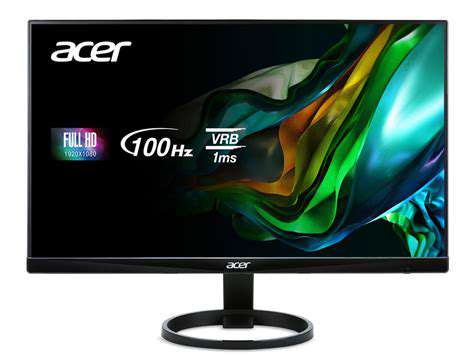
The Acer R240HY boasts a sleek, ultra-thin design which not only enhances the aesthetics of any home office but also saves precious desk space. This monitor features a 23.8-inch IPS panel, offering a full HD resolution of 1920 x 1080 pixels. With a bezel-less design, it provides an immersive viewing experience, making it ideal for multitaskers who need to keep several windows open side by side.
One of the standout features of the R240HY is its 178-degree wide viewing angles, which ensure that colors remain vivid and true from virtually any angle. This is particularly beneficial for those who might share the screen during video calls or presentations. Additionally, the monitor supports 100% of the sRGB color gamut, making it a great choice for graphic designers or anyone who requires accurate color representation.
Performance and Connectivity
- Full HD resolution with an IPS panel.
- 178-degree wide viewing angles for better visibility.
- Multiple connectivity options for versatile use.
In terms of performance, the Acer R240HY provides a refresh rate of 60Hz, which is suitable for general office tasks and even some casual gaming. While it may not be the best choice for competitive gaming due to the lack of higher refresh rates, it handles video playback smoothly, ensuring that streaming is enjoyable. Moreover, its 4ms response time means that ghosting is minimal, providing a clear image during dynamic scenes.
When it comes to connectivity, the R240HY includes HDMI and VGA ports, making it versatile enough to connect to various devices. For users looking to set up dual-monitor configurations, this monitor’s ability to plug and play makes it a convenient choice. Overall, if you're looking for a combination of style, performance, and connectivity, the Acer R240HY is certainly worth considering for your home office.
4. LG 27UK850-W
Display Performance
The LG 27UK850-W features a 27-inch IPS display, offering exceptional color accuracy and wide viewing angles. With a resolution of 3840 x 2160, this monitor boasts a 4K Ultra HD experience that enhances productivity when multitasking. The 99% sRGB color gamut allows for vibrant colors, making it an ideal choice for graphic design or video editing workflows.
Additionally, its HDR10 support provides a broader range of colors and luminance. Users can expect deeper blacks and brighter whites, resulting in more realistic imaging. This feature particularly benefits those engaging in media consumption or visual content creation, helping them to perceive subtle nuances in their work.
Ergonomic Design
The monitor's ergonomic design facilitates extended use, which is essential for home office setups. With height, tilt, and pivot adjustments, users can customize the monitor's position for optimal comfort. This adjustability can significantly reduce the risk of neck and back strain during long work hours.
Furthermore, the borderless design enhances the overall aesthetic, making it suitable for modern office environments. Its sleek profile allows for a clean and efficient workspace, while also enabling multi-monitor setups without the distraction of thick bezels.
Connectivity Options
In terms of connectivity, the LG 27UK850-W excels with multiple options. It includes USB-C, HDMI, and DisplayPort inputs, allowing seamless connections to various devices, including laptops and desktops. The USB-C port, in particular, is convenient for those who want to connect their MacBook and charge it simultaneously, simplifying desk cable management.
The inclusion of built-in USB hubs enhances functionality, providing users with easy access to peripherals. All these connectivity options cater to different use cases, whether for business tasks, gaming, or creative projects. This versatility makes it a practical choice for diverse needs.
Color Calibration and Editing Tools
The LG 27UK850-W comes Factory-calibrated for color accuracy, ensuring that what you see on the screen closely matches the final output. This aspect is crucial for professionals who work in fields such as photography or video production, where color fidelity is paramount.
For users who require further adjustments, LG provides user-friendly software for color calibration. The OnScreen Control feature allows for quick adjustments to settings such as brightness, contrast, and color profiles. This tool is especially beneficial when working across different devices and environments, ensuring consistent results.
Energy Efficiency
Energy efficiency is another notable aspect of the LG 27UK850-W. It is equipped with features like a power-saving mode that contributes to lower energy consumption without sacrificing performance. Monitors that prioritize energy efficiency help users save on electricity bills, which is advantageous for a home office setup.
Moreover, the monitor is Energy Star certified, which further emphasizes its commitment to reducing environmental impact. Adopting energy-efficient devices can make a notable difference in long-term sustainability efforts, aligning with the increasing trend of eco-conscious consumer behavior.
User Feedback and Reviews
When assessing the LG 27UK850-W, user reviews are overwhelmingly positive, highlighting its value for money in the budget monitor category. Many users commend its clarity, ease of setup, and robust build quality. Such feedback provides reassurance for potential buyers, especially those hesitant about investing in a monitor that balances cost with performance.
However, some users have noted that while the colors are incredible, they require initial calibration to meet specific professional needs. This minor adjustment is worth the payoff as it elevates the working experience significantly. Potential buyers should consider these aspects to make an informed decision.
5. BenQ GW2480
Display Features of the BenQ GW2480
The BenQ GW2480 boasts a 24-inch IPS panel with a full HD resolution of 1920x1080 pixels, providing clear and vibrant imagery. This monitor is ideal for home office use, as it delivers sharp text and accurate color reproduction, making it suitable for prolonged work sessions or multimedia consumption.
Additionally, the GW2480 incorporates Flicker-Free technology and Low Blue Light modes, which help reduce eye strain and fatigue commonly associated with long hours in front of a screen. These features are especially beneficial for individuals who spend most of their day working on various tasks, from editing documents to video conferencing.
Connectivity Options
In terms of connectivity, the BenQ GW2480 is equipped with multiple input options, including HDMI, DisplayPort, and VGA. This variety allows users to easily connect their devices, whether it's a laptop, desktop, or other peripherals like projectors. Having these options makes it a versatile choice for varied home office setups.
Design and Ergonomics
The sleek, frameless design of the GW2480 enhances its modern appeal, making it an aesthetically pleasing addition to any home office. Its slim profile not only saves space on your desk but also integrates seamlessly with multi-monitor setups. Moreover, the monitor’s built-in cable management system keeps your workspace tidy.
Performance and User Experience
The BenQ GW2480 performs well in both bright and dim lighting conditions, thanks to its wide viewing angles and consistent color accuracy. Reviewers often note the monitor's performance in professional tasks, such as graphic designing and data analysis, providing a reliable experience without screens becoming washed out.
Users report that the monitor's color quality stands up against other monitors in its price range, making it a strong contender for those looking for value without compromising on performance. It creates an engaging experience for both work and entertainment.
Pricing and Value
With a price point typically around $180, the BenQ GW2480 presents an excellent value proposition within the budget monitor market. For consumers looking to balance budget with performance, this monitor offers significant features not commonly found in lower-priced models. Investing in the GW2480 can pay off in terms of enhanced productivity and comfort.
User Reviews and Feedback
Feedback from users often highlights the monitor’s reliable performance and ergonomic features as major selling points. Many users appreciate the aspect of eye care built into its design, remarking how it makes long working hours more tolerable. These positive user experiences are reflected consistently across various review platforms.
Conclusion and Recommendations
In conclusion, the BenQ GW2480 stands out as one of the best budget monitors for home offices, combining quality, performance, and ergonomic features effectively. It is particularly recommended for remote workers who require a dependable display that supports long-term use. If you’re seeking a blend of performance and value, this model may very well meet your needs.
Read more about Best Budget Monitors for Home Offices


![Review: The Newest Smart Thermostats [Energy Saving & Features]](/static/images/25/2025-07/ExploringtheLatestSmartThermostatModels.jpg)